Seeing a foreign currency at checkout is the fastest way to lose an international customer. By providing a multi-currency checkout, you remove the “mental math” barrier and build immediate trust. This guide explores why local pricing and having a currency switcher on your WooCommerce store are a growth requirement and how the right plugin automates this global expansion.
I’ve spent years working inside the WordPress ecosystem, helping people build stores that actually convert. One of the biggest mistakes I see is the “US-Centric” trap. Many store owners assume that because the US Dollar is a global reserve currency, everyone is happy to shop in it. But honestly, that is not how consumers think. When a shopper in Paris or Tokyo lands on your site and sees a price in USD, they don’t see a “Global Brand.” They see a barrier. They see an extra step. They see a potential hidden fee from their bank.
As a founder who has spent a lot of time troubleshooting these exact issues for WooCommerce users, I realized that global growth isn’t just about shipping; it’s about financial comfort. If you want to scale globally, you have to stop asking your customers to do the work of a currency converter. You need to meet them where they are.
The Psychology of Financial Safety
When we talk about eCommerce, we talk a lot about “trust signals.” We add SSL badges, we show reviews, and we use professional themes. But the most powerful trust signal is the one that tells the customer exactly how much money will leave their wallet.
I think of it as “Financial Fluency.” When a customer sees a price in their native currency, their brain doesn’t have to pause. There is no hesitation. But the second they see a foreign symbol, a series of questions pop up: “What is the current exchange rate? Is this price competitive in my local market? Will my bank charge me a 3% international transaction fee?”
But here’s the thing: every one of those questions is a reason to close the tab. By the time they open a new window to check Google for a conversion rate, you’ve likely lost them. A multi-currency checkout provides an immediate answer to the “How much does this cost?” question. It provides a sense of safety and transparency that a single-currency store can never match.
Transparency vs. The Hidden Transaction Fee
One of the biggest complaints international shoppers have is the “surprising” final total on their bank statement. If you sell an item for $100 USD, and the customer is in the UK, their bank might convert that at a poor rate and then add a “Foreign Transaction Fee” on top. The customer blames the store, not the bank.
By using a professional WordPress plugin to handle your checkout, you can display the final, converted price including any buffers you want to add. This transparency is what builds long-term loyalty. The customer knows that the price they see on the product page is exactly what they will see on their credit card statement.
Also, it is worth noting that international customers are often more cautious about buying from abroad. They worry about shipping times, customs, and returns. If you can’t even get the currency right, why should they trust you to get the delivery right? A localized checkout is a signal that you are a sophisticated, global operation that is ready to serve them.
Automation: The Core of Global Scaling
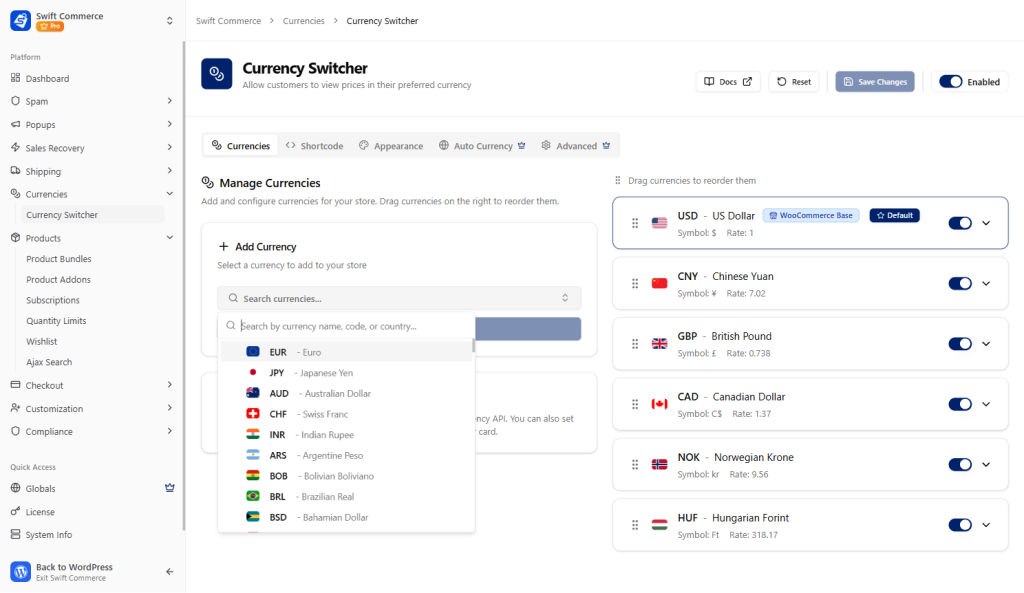
If you are a solo founder or a small team, the thought of managing exchange rates for 130+ countries sounds like a nightmare. You don’t have time to wake up and check the markets every morning. This is where a high-quality WooCommerce addon becomes your most valuable asset.
I’ve always focused on building tools that simplify the technical landscape for store owners. When we developed the Currency Switcher feature within our plugin, we prioritized “Set and Forget” automation. You don’t need to be an economist to sell globally; you just need a system that handles the math for you.
1. Auto Rate Conversion and Margin Protection
The exchange rate is never static. If the market moves 2% against you overnight, you could lose your entire profit margin on an international order. Our plugin uses Auto Rate Conversion to pull live data from reliable financial APIs.
But here’s the thing: you shouldn’t just rely on the “Mid-Market” rate. Your payment processor is going to take a cut when they convert that money for you. This is why we included the ability to add a Manual or Increased % Addition on each currency. You can set a 2% or 3% buffer so that your net profit is protected, regardless of how the market fluctuates. It’s about being smart with your margins while still being fair to the customer.
2. Geo-Detection: The Frictionless Entry
The best currency switcher is the one the customer never has to touch. If a shopper has to hunt for a dropdown menu to change the currency, you’ve already failed the UX test.
By using Auto Currency based on Geo-Detection, our plugin identifies the user’s location via their IP address the moment they land on your site. A customer in London sees Pounds; a customer in Sydney sees Australian Dollars. This happens instantly, providing a localized experience from the very first second. This is a critical factor when you are trying to improve your website speed. If the conversion happens fast and invisibly, it feels like a native experience rather than a “translated” one.
3. Global Reach with 130+ Currencies
Whether you are selling to a niche market in Europe or a massive audience in Southeast Asia, you need coverage. Our plugin supports 130+ currencies, ensuring that no matter where your audience is, they can shop in a way that feels familiar.
What’s more, this isn’t just about the major players like the Euro or the Pound. Supporting smaller, local currencies is often the key to “owning” a specific geographic niche. If your competitors are only selling in USD but you are selling in their local currency, you win the trust battle every single time.
Design and Design Control: The Elementor Widget
As someone who has spent a lot of time with tools like Elementor, I know that if a feature doesn’t look good, it won’t be used. Most currency switchers look like a default HTML dropdown from twenty years ago. They break your theme’s design and look untrustworthy.
We solved this by including a dedicated Elementor Widget for the currency switcher. You can drag and drop it into your header, footer, or sidebar. You have full control over the typography, the colors, the border-radius, and whether you want to show flags or just currency codes.
I think of the currency switcher as a piece of branding. It should feel like an integrated part of your store’s identity. When it matches your security and compliance checklist, it builds a unified wall of professionalism. It tells the user that every detail of the store has been carefully considered.
Beyond the Price: PERSISTENCE is Key
A common issue I see with poor multi-currency setups is “Currency Amnesia.” The product page shows Euros, but the moment the customer adds the item to the cart, it jumps back to USD. This is a massive red flag for a buyer. It feels like a “bait and switch,” even if it’s just a technical glitch.
A professional WordPress plugin ensures that the currency choice is persistent across the entire session. From the product archive to the single product page, through the cart, and finally to the checkout page, the currency remains the same. This continuity is the “glue” that holds the global trust together.
Also, it is worth noting that this persistence needs to extend to your emails and receipts. If someone buys in Yen, their confirmation email should show Yen. Our plugin handles this “End-to-End” flow, ensuring that the customer never feels like they are being jerked around by the system.
Practical Steps for Global Growth
If you are ready to stop being a “local” store and start being a global brand, I suggest a phased approach. You don’t need to enable all 130 currencies on day one.
- Audit Your Traffic: Look at your Google Analytics. Where is the traffic coming from that isn’t converting? If you have 500 visitors a month from Canada but zero sales, that is your first target currency.
- Set Your Buffers: Don’t just go with the “flat” rate. Add a small percentage to cover your payment gateway’s conversion fees.
- Test the Geo-Detection: Use a VPN to check your site from different countries. Does the currency switch instantly? Does it feel smooth?
- Simplify the Checkout: Use your currency switcher in tandem with a clean checkout flow to minimize abandonment.
I’ve seen stores transform their revenue just by adding three or four key currencies. It’s not about doing more marketing; it’s about making the marketing you already do more effective. It’s about respecting the customer’s context.
Final Thoughts: The World is Your Marketplace
Scaling a WooCommerce store is a journey of removing barriers. You remove the speed barrier, you remove the security barrier, and you remove the language barrier. But the most important barrier to remove is the financial one.
By providing a multi-currency checkout, you are telling the rest of the world that you are open for business. You are moving away from the “One Size Fits All” mentality and toward a customer-first strategy that values trust above all else.
I’ve always thrived on creating meaningful impact through the products I build. Seeing a founder use Swift Commerce to sell their first product to a customer 5,000 miles away is exactly why I do this. It’s about more than just code; it’s about the freedom to grow without limits.
Take the leap into the global market. Start with the currencies that matter most to your audience, protect your margins with smart markups, and watch as your “Average Order Value” begins to include symbols from every corner of the map.