The moment you decide to take your WooCommerce store global, you are essentially opening a door to billions of potential customers. It is an exciting prospect, but honestly, it is also the moment many store owners start to feel the “international weight” of their business. Selling in your home country is straightforward: you know the currency, you know the taxes, and you know the customer’s expectations. But when you start shipping to London, Tokyo, or Dubai, everything changes. The core problem is that if you don’t speak the customer’s financial language, they won’t feel safe enough to buy from you.
I’ve spent years in the WordPress space, much of it helping users at Elementor navigate the complexities of building high-performance sites. I’ve seen countless stores stall because they treat internationalization as an afterthought. They think a simple translation plugin is enough. But the truth is that the fastest way to grow globally is to show the price in a way that feels “local.” This article is designed to show you how to manage a multi-currency store without losing your margins or your site’s performance.
The Psychology of Local Pricing and Global Trust
There is a specific kind of “mental friction” that happens when a customer sees a price in a foreign currency. Perhaps they are interested in your product, but then they see a “$” instead of a “£” or a “€.” Instantly, they have to do math. They have to open a new tab to check the current exchange rate, and then they have to wonder what hidden fees their bank will slap on top of that. For most shoppers, that is too much work.
I think of currency as the first bridge of trust in eCommerce. When you show a local price, you are telling the customer that you have thought about their specific experience. You are removing the “guesswork.” This is exactly why I focused so heavily on the currency switching logic when I was developing my WordPress plugin. I wanted to create a way for store owners to offer that “Big Brand” global feel without the clunky interface of legacy addons.
But here is the thing: you can’t just flip a switch and hope for the best. You need to understand how local pricing affects your WooCommerce sales automatically. If a customer feels a surge of trust because they see their own currency, they are much more likely to complete the checkout. If they feel confused, they’ll abandon the cart, and you’ll find yourself chasing them with recovery emails that might have been unnecessary if the price was right in the first place.
The Logistics of Automated Multi-Currency Management
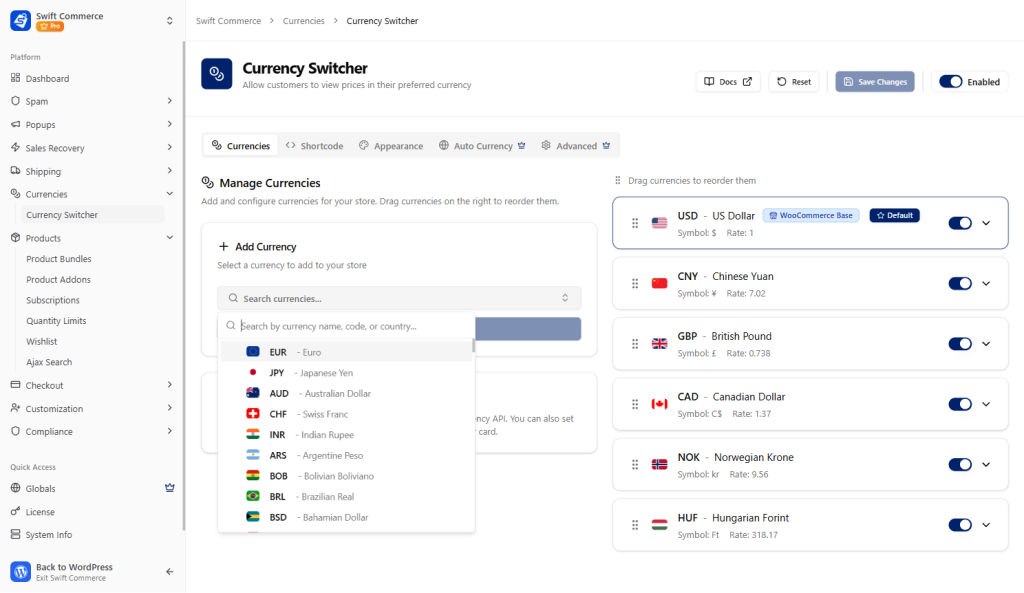
If you were to manage exchange rates manually, you would never sleep. Global markets move every second. This is where the technical foundation of your WooCommerce addon becomes critical. You need a system that is “set and forget.”
When we built the currency features for our WordPress plugin, we ensured it supported more than 130 currencies right out of the box. But the “Guru” move isn’t just having the list; it’s the Auto-Detection logic. Using Geo-IP detection, your store should automatically know where the customer is standing. If a user lands on your site from Paris, they should see Euros. If they land from Peshawar, they should see Rupees.
Technically, this requires a very high-performance React-based logic that happens the moment the page starts to load. Most older addons use heavy, server-side requests that cause a “price flicker” where the price starts in USD and then jumps to the local currency a second later. That flicker is a trust killer. We’ve optimized our lightweight plugin to handle this transition invisibly, so the customer feels like the site was built just for their region. It is worth noting that this kind of performance is what keeps your store speed in the green.
Protecting Your Margins with Strategic Markups
One of the most common concerns I hear from store owners is: “What if the exchange rate changes after I sell the item but before I get paid?” This is a very real risk. Payment processors like Stripe or PayPal often take a 2% to 3% cut for currency conversion, and if the market shifts by another 1%, you could lose 4% of your total revenue on every international sale.
What’s more, you have to account for these “hidden costs” in your pricing strategy. This is why we included a Percentage Markup feature in our WooCommerce addon. I call this the “Safety Buffer.” You can set the plugin to pull the live exchange rate and then automatically add a small percentage (say 2% or 3%) on top of it.
This ensures that your net profit remains identical across all countries. The customer still gets the convenience of seeing their local currency, and you get the peace of mind knowing that your margins are protected from market volatility. It’s a win-win. Also, for those who want even more control, you can use Fixed Rates. This is great if you want your prices to always end in “.99” regardless of what the live exchange rate is doing. It keeps your branding consistent and professional.
Design and Design Control: The Elementor Connection
I spent a lot of my career helping the community build beautiful sites with Elementor, so I know that design is never “just” about looks—it is about conversion. If your currency switcher looks like a default, unstyled dropdown menu, it is going to stick out like a sore thumb.
When you use our WordPress plugin, you get a dedicated Elementor Widget for the currency switcher. This means you can drag and drop it into your header, style the typography to match your theme, and choose whether you want to show flags, currency codes, or symbols.
I’ve noticed that store owners who place their currency switcher prominently in the header—next to the cart icon—see a significant increase in international sales. It acts as a “Welcome” sign for the rest of the world. It tells the user right away that “Yes, we ship to you, and yes, we know your currency.” This level of design integration is part of what makes a store feel “Premium” rather than “Patchwork.”
International Compliance and Security
Scaling globally isn’t just about selling; it is about staying safe. As you open your store to more countries, you are also opening it to more bots and bad actors. In fact, research shows that automated bot traffic now accounts for roughly 52% of all web activity. Many of these bots are specifically looking for eCommerce sites to scrape data or test stolen credit cards.
This is why a global scaling strategy must include a “Security First” mindset. You need to ensure your website security and compliance are up to date. We’ve built features like invisible reCAPTCHA v3 and Email Verification into our plugin to help you manage this.
But here is the thing: international customers are often more sensitive to data privacy. They want to know their data is protected. By using a lightweight plugin that consolidates your security, currency switching, and compliance tools (like Cookie Consent), you are providing a unified front of trust. You aren’t just selling a product; you are providing a secure global shopping environment.
Scaling Without the Legacy Bloat
I have to be honest with you: the biggest hurdle to global scaling for most WooCommerce sites isn’t the exchange rate, it is the technical debt. Most store owners try to scale by adding ten different individual plugins for their international needs. One for currency, one for shipping rates, one for security, and one for a field editor.
Before long, the site is dragging around a massive amount of unoptimized code. Each one of those plugins has its own database queries and its own JavaScript files to load. This is the “Legacy Bloat” that kills conversion rates. I built Swift Commerce to be a lightweight alternative to that fragmented mess.
By consolidating 15+ high-value features into a single WooCommerce addon, we’ve eliminated the conflict between different plugins. This is especially important for international users who might be browsing on slower mobile connections in different parts of the world. A site that loads fast in New York also needs to load fast in London or Peshawar. A lightweight architecture is your best global marketing asset.
Checkout Optimization for the Global Buyer
The checkout is where the global sale is won or lost. Every country has different expectations for what a checkout should look like. In the US, people expect a “Zip Code” first; in other parts of the world, that field might not even exist.
If your checkout is cluttered with unnecessary fields, your international abandonment rate will skyrocket. This is why using a Checkout Field Editor is so critical for global scaling. You can use our plugin to hide redundant fields that don’t apply to specific countries, making the flow as short as possible.
What’s more, your multi-currency setup needs to follow the customer through to the final “Order Complete” button. There is nothing more frustrating than seeing a price in Pounds on the product page only for it to jump back to Dollars at the final payment step. Our plugin ensures that the currency choice is persistent, providing a seamless experience from the homepage to the receipt.
Practical Steps for Global Scaling
If you are ready to take your store to the next level, I think the best approach is to start with a “Region-First” strategy. Don’t try to master all 130+ currencies on day one.
- Identify Your Top 3 Global Markets: Look at your analytics. Where is your traffic coming from? If you see a lot of hits from Canada or the UK, start by enabling CAD and GBP.
- Enable Auto-Detection: Flip the switch on the Geo-IP detection so those users see their currency immediately.
- Set Your Markup: Add a 2-3% markup to cover those conversion fees and protect your bottom line.
- Design Your Switcher: Use the Elementor widget to make sure the switcher is easy to find but doesn’t distract from your products.
- Audit Your Speed: Run a speed test from a server in the region you are targeting. If the site is slow, check for plugin bloat and consider moving to a more lightweight solution.
But here is the thing that many people miss: global scaling is about empathy. You are trying to make a customer thousands of miles away feel like you are right next door. You are showing them that you understand their money, their security concerns, and their time.
Why “Unified” is Better for the Founder
As a founder myself, I know that your time is your most valuable resource. You don’t want to spend your weekends updating exchange rates or troubleshooting plugin conflicts.
I’ve always thrived on creating meaningful impact through technical solutions. My goal with our plugin was to give the power of an “Enterprise-Grade” global store to every WooCommerce founder, without the enterprise-grade complexity. By using a unified, lightweight addon, you are making your life easier while making your store more profitable.
Scaling globally shouldn’t be a headache. It should be a celebration of your brand reaching a new audience. When you have the right tools in place, the kind that handle the math, the security, and the design, you can stop worrying about the “how” and start focusing on the “what.” What products will you launch next? What markets will you conquer tomorrow?
Final Thoughts: The Future is Multi-Currency
The world is only getting smaller. In 2026, a “local-only” store is a store that is leaving money on the table. Whether you are selling digital courses for driving instruction in the UK or physical products to law firms in the US, your audience is global.
By prioritizing a multi-currency experience, you are future-proofing your business. You are building a store that is as fast as it is flexible, and as secure as it is welcoming. It is worth the effort to set this up correctly now, so you don’t have to rebuild it later when your traffic explodes.
Honestly, the best time to go global was yesterday. The second-best time is today. Use a lightweight, professional plugin to bridge the gap and start selling to the world. Your customers are already out there; you just need to start speaking their language.