


WooCommerce currency switcher.
Prices shoppers understand.
Let shoppers choose a familiar currency and read converted product prices. Free includes manual currency selection, rates and conversion fees. Pro adds fixed product prices, scheduled sale prices and expanded switcher controls.
Currency Switcher for WooCommerce. Part of the Swift Commerce WordPress plugin.

A WooCommerce currency switcher for familiar product prices.
Choose supported currencies from the WooCommerce currency catalogue, set rates and place the switcher with a shortcode. Product and variation prices can follow the shopper’s choice. Pro adds product-specific regular and sale prices, bulk price review and an Elementor widget.
Choose from 100+ currencies, then put the switcher where shoppers need it.
Search a catalogue of more than 100 supported currencies, enable the ones for your store and place the switcher with its shortcode. Shoppers can make a manual choice that the store remembers.

Set exchange rates and choose how to refresh them.
Enter rates relative to your store currency or fetch a current rate set using Update Rates Now with ExchangeRate-API selected. Review the returned rates, then save your changes. This manual refresh is separate from scheduled updates.
Pro exposes provider and automatic-update controls, but the current scheduling integration needs correction before unattended updates can be relied on. Use manual rates or the on-demand refresh in the meantime.

Show the result of fees and rounding before saving.
Each currency can have a fixed or percentage conversion fee and supported up, down or nearest-increment rounding. A sample calculation helps you inspect the final displayed product price.
For example, a base price of 100 at a 0.92 rate becomes 92; a 2% fee makes it 93.84, and rounding to the nearest 0.50 makes it 94.00. Fixed Pro prices bypass conversion fees and rounding. See how conversion fees work.

Carry the choice through product browsing.
Supported WooCommerce product and variation price filters display converted amounts on product listings and detail pages. The selected currency remains the shopper’s explicit choice.
Currency selection is not a payment-gateway integration. Check product prices, shipping, tax, the final order currency and your gateway’s supported currencies on a test checkout before offering a currency to customers.

Present only the currency details that shoppers need.
Free supplies the core templates, colors and font sizing. Pro can control whether flags, codes, names and symbols appear, along with additional switcher layout and alignment choices.
Use a compact format in tight navigation and a fuller list where a shopper needs to compare choices.

Set a deliberate price for a particular product.
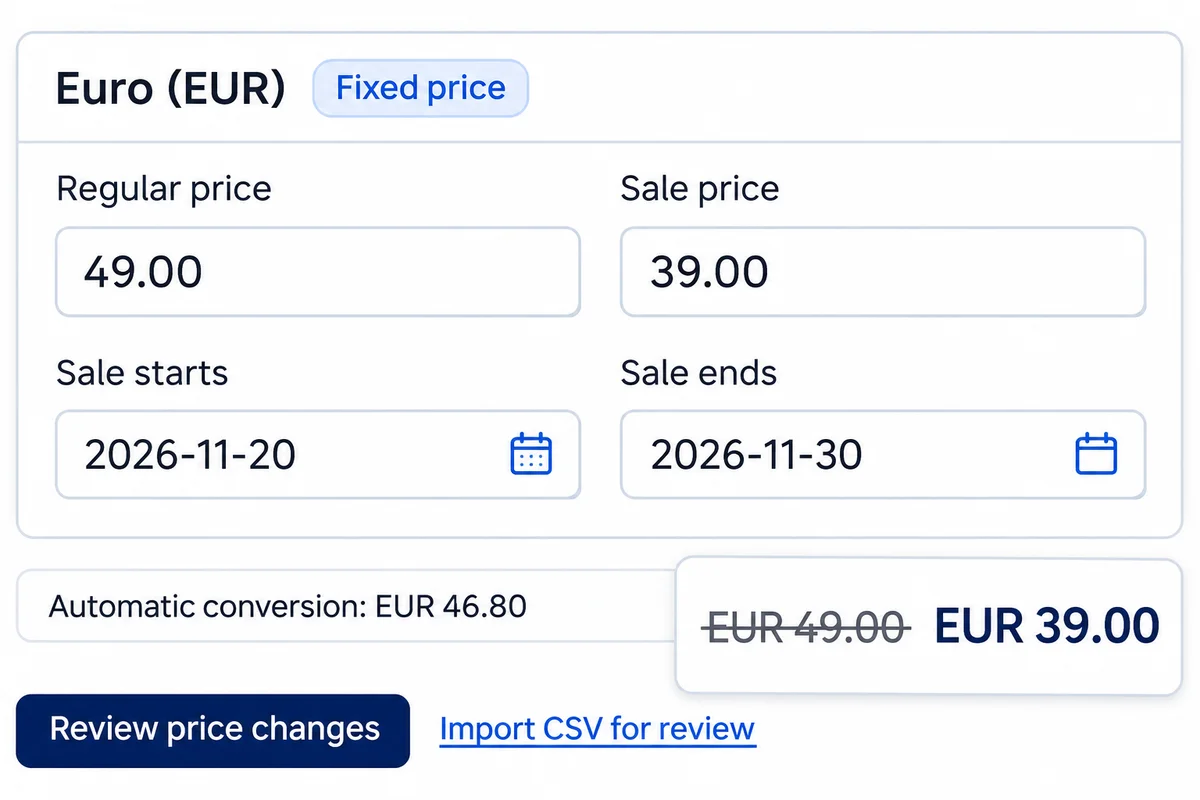
Pro lets you choose a local price instead of always using conversion. A product priced at USD 100 can have a fixed EUR 89 price; that fixed amount bypasses the currency’s rate, fee and rounding. Leave the override blank to use conversion.
Set an override in Product data → Currency Prices or use the dashboard’s Product Prices tab. Fixed pricing supports simple and external products, standard variations and fixed-price Swift Commerce bundles—not subscription plans or calculated bundles.

Manage regular and sale prices in each currency.
Pro adds product-specific regular and sale prices, with optional sale start and end dates. Keep automatic conversion where it makes sense, or choose an intentional local price for a supported product or variation.
Use Currency Switcher → Product Prices to review changes before applying them. Export the current page or import a CSV for review. A pricing-precedence setting lets you preserve compatible base-price adjustments on top of fixed currency prices.
Get the full feature.
And the rest of the suite.
One Swift Commerce Pro license unlocks the complete feature set across all 16 tools, advanced design controls and premium support. No separate purchase for Currency Switcher.
Compare Free and Pro.
Start with the Currency Switcher essentials in Free, or use Pro for the expanded controls shown below.
| What you can do | Free | Pro |
|---|---|---|
| Manual currency choice and persistence | Included | Included |
| Fixed exchange rates and manual update-now action | Included | Included |
| Product and variation price conversion | Included | Included |
| Conversion fees and supported rounding | Included | Included |
| Switcher shortcode and core templates | Included | Included |
| Flag, name, code and symbol display controls | Not included | Included |
| Additional layout and alignment controls | Not included | Included |
| Product-specific currency prices and Elementor widget | Not included | Included |
| Per-currency regular/sale prices and sale dates | Not included | Included |
| Product Prices dashboard with review-before-apply editing | Not included | Included |
| CSV price review and pricing-precedence controls | Not included | Included |
Questions about Currency Switcher.
Specific answers about setup and Free versus Pro.
Can I add more than one extra currency in Free?
Yes. The current Free plugin is not restricted to one additional currency. Add supported currencies, enable the ones you need and place the switcher using its shortcode. Pro’s differences include fixed product prices, sale schedules and expanded controls—not an unlimited-currency promise.
Where can I put the currency switcher?
Use [swift_commerce_currency_switcher] in a WordPress Shortcode block or another shortcode-compatible area. Pro also includes an Elementor currency-switcher widget. Follow the multiple-currency setup tutorial and check the placement on mobile.
What is the difference between manual and automatic rate updates?
Manual rates stay as you enter them. Update Rates Now fetches rates on demand with ExchangeRate-API selected; review the rates and save them. Pro has automatic-update controls, but the current scheduling integration needs a fix before unattended updates can be relied on.
Can I choose a fixed price instead of converting it?
Yes, Pro supports per-currency regular and sale prices for supported products and variations. For example, keep a product at EUR 89 rather than recalculating it whenever the exchange rate changes. Blank prices use automatic conversion; zero is an intentional fixed price.
How do conversion fees and rounding affect fixed prices?
Automatic conversion applies the exchange rate, then a fixed or percentage fee, then the currency’s rounding rule. A fixed Pro price bypasses those conversion fees and rounding. Coupons apply afterwards; compatible base-price adjustments follow your pricing-precedence setting.
Can I schedule a sale in another currency?
Yes, Pro supports currency-specific sale amounts with optional start and end dates. Dates are inclusive and use the WordPress site’s timezone. A blank currency sale inherits the active base sale’s discount; see the Product Prices reference for the rules.
Does importing a price CSV immediately change my store?
No. Import CSV for review prepares changes for inspection. Choose Apply reviewed prices only after checking them; results are reported per product. Export covers the current page rather than the entire catalogue.
Will every payment gateway accept the selected currency?
No. A familiar displayed price does not mean your gateway can charge or settle that currency. Test the final cart, shipping, tax and order currency with your gateway and pricing extensions before enabling the currency for shoppers.
Does location-based switching work automatically?
The current normal-dashboard settings do not fully connect to the legacy detection path, so do not rely on geolocation switching yet. Manual currency selection remains the supported fallback. We will update this guidance after the integration is corrected and tested.