


WooCommerce shipment tracking.
Keep every parcel connected.
Manage WooCommerce shipment tracking with carrier references, customer links and notifications in Pro. Free provides the shared carrier and settings configuration for the tracking workspace.
Shipment Tracking for WooCommerce. Part of the Swift Commerce WordPress plugin.
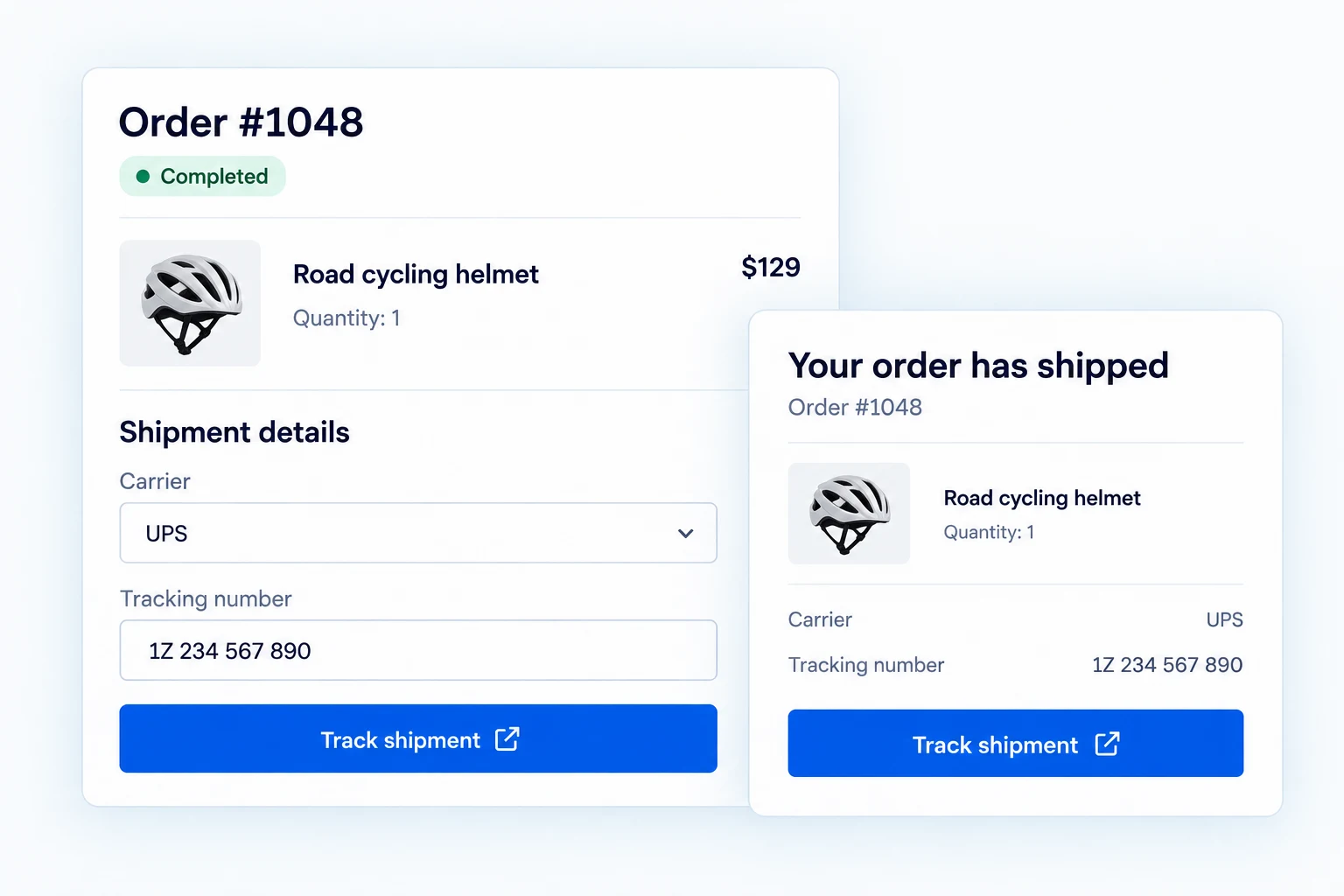
Keep WooCommerce shipment tracking with the order.
Free provides shared setup and carrier configuration. Pro adds the working order-shipment workflow: tracking entries, carrier links, customer emails, account displays and a public lookup form.
Add tracking where your team manages the order.
The Pro order screen provides a shipment panel to select a carrier, enter a tracking number, add a ship date and choose whether to notify the customer.
Tracking additions and removals are recorded in order notes, so staff can see what changed.

Give each package its own reference.
When an order ships in more than one box, add multiple tracking items to that order. Each item retains its carrier, number and date.
A CSV import endpoint is available for integrations; this is an API pathway, not a promised dashboard uploader.

Make a tracking number useful to the customer.
Built-in carrier patterns and Pro custom carrier URLs turn saved numbers into links to the carrier’s tracking page. Free can configure standard carriers, but shipment entry and customer display are Pro runtime features.
These links do not supply live delivery telemetry inside Swift Commerce.

Put the link in the places customers check.
Pro can include shipment details in supported WooCommerce order emails and My Account order details. A dedicated tracking email can be sent when a shipment is added.
Open the Pro tracking notification in the shared Email Customizer. Edit its subject and message with order, customer and tracking placeholders, preview the email, and send a test. Your team can still decide whether to notify the customer for each shipment.

Offer a tracking form on your own site.
A Pro shortcode adds a public lookup form; shoppers can search by tracking number or by order number with matching billing email. An Elementor widget offers the same placement in a builder page.
Order-based lookup enforces ownership or the matching billing email rather than exposing an order to anyone who guesses its number.

Keep the tracking page consistent with the store.
The public form has editable copy and appearance settings, including responsive styling. It can link customers onward to the carrier where the actual delivery updates live.
The present dashboard analytics area is not connected to shipment data, so this page does not advertise an analytics report.

Send a tracking email that feels like your store.
With Pro, open the tracking notification in the shared Email Customizer. Edit its subject and message, insert order and tracking placeholders, preview the result and send a test.
Your team still decides whether to notify the customer for each shipment. Tracking emails are a Pro capability; Free does not send them.

Get the full feature.
And the rest of the suite.
One Swift Commerce Pro license unlocks the complete feature set across all 16 tools, advanced design controls and premium support. No separate purchase for Shipment Tracking.
Compare Free and Pro.
Start with the Shipment Tracking essentials in Free, or use Pro for the expanded controls shown below.
| What you can do | Free | Pro |
|---|---|---|
| Shared setup and standard carrier configuration | Included | Included |
| Add tracking in the WooCommerce order screen | Not included | Included |
| Multiple tracking items per order | Not included | Included |
| Carrier links and custom carrier URLs | Not included | Included |
| Tracking in customer emails and My Account | Not included | Included |
| Dedicated notification email with placeholders | Not included | Included |
| Public tracking form and Elementor widget | Not included | Included |
| Order-number lookup with billing-email check | Not included | Included |
| Order-note history and CSV import endpoint | Not included | Included |
Questions about Shipment Tracking.
Specific answers about setup and Free versus Pro.
Can Free add a tracking number to an order?
Not through the current runtime. Free includes shared settings and standard-carrier configuration; order shipment entry is Pro.
Does Swift Commerce show a carrier’s live delivery status?
No. It stores references and builds links to the carrier’s tracking page.
Can an order have more than one package?
Yes, Pro supports multiple tracking items on the same order.
Can anyone find an order from its number?
Order-number lookup also requires the matching billing email or authenticated ownership.
Is there a CSV uploader in the dashboard?
The verified batch pathway is a Pro REST import endpoint, not a confirmed dashboard upload screen.
Are tracking analytics ready?
The current analytics screen is not connected to shipment data, so it is not presented as an available report.