Slow site speed is the quietest killer of WooCommerce sales. Every second your checkout hangs, your conversion rate drops by up to 7%. This guide breaks down exactly how to audit your performance, eliminate the ‘plugin overload’ crisis, and use a unified engine to reclaim your revenue.
Honestly, I’ve seen this play out a hundred times. A store owner spends thousands on Facebook ads or influencers to drive traffic, but then they let that traffic land on a site that takes four seconds to load a product page. It’s like inviting a guest to your home and then making them wait at the front door while you look for the keys. By the time you open the door, they’ve already walked away.
I remember back when I was working at Elementor, I spent a lot of my time helping people figure out why their “beautiful” sites weren’t actually selling anything. The answer was almost always the same: the site was beautiful, but it was incredibly slow. In the world of eCommerce, beauty doesn’t pay the bills—speed does. If you aren’t prioritizing the time it takes for a customer to move from “Add to Cart” to “Order Complete,” you are essentially throwing your marketing budget into a black hole.
The Brutal Math of the 100ms Rule
We often talk about seconds when we discuss site speed, but in 2026, the real battle is won in milliseconds. There is a famous rule of thumb in the industry: every 100ms of delay in load time can result in a 1% drop in revenue. Think about that for a second. If your site is just one second slower than your competitor’s, you are effectively paying a 10% “slowness tax” on every single order.
Perhaps it’s worth noting that the human brain process visual information much faster than we think. When a customer clicks a button and nothing happens for 300ms, their brain registers a “hiccup.” If that happens three or four times during a checkout process, they start to feel a sense of subconscious friction. They start to wonder if the site is secure, if their credit card info is safe, or if the order will even go through.
This is why WooCommerce site speed isn’t just a technical metric; it’s a trust metric. When your site is fast, it feels reliable. It feels professional. It feels like a place where someone can safely spend their money. But here’s the thing: you can’t just “wish” your way to a fast site. You have to understand what is actually slowing it down.
The “Plugin Overload” Crisis: A Developer’s Perspective

I have to be a bit blunt here. Most WooCommerce stores are suffering from what I call the “Plugin Overload” crisis. We’ve all been there—you need a wishlist, so you install a plugin. You want a currency switcher, so you install another. You need abandoned cart recovery, so you add a third.
Before you know it, you have 15 or 20 different plugins all trying to run their own scripts, load their own styles, and talk to your database at the exact same time. It’s a technical nightmare. Each one of those plugins is like a tiny weight tied to your store’s ankles. One or two might not matter, but 20 of them will sink you.
I’ve analyzed hundreds of stores and noticed a recurring pattern. A “Standard Stack” of individual plugins for things like bundles, addons, and recovery can easily add 2-3 seconds to your total load time. This is precisely why I founded Swift Commerce. I wanted to create a unified WooCommerce plugin that provides all those high-value features in a single, lightweight Dashboard. Instead of 15 different developers writing code that fights with each other, you have one cohesive system designed to work as a single unit.
Why Google Cares About Your Checkout Speed (INP)
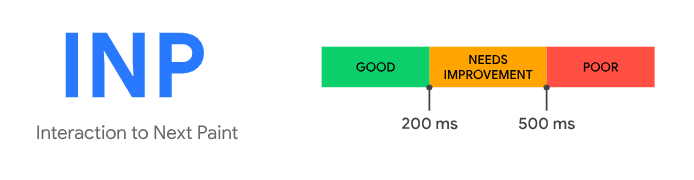
In 2026, Google has moved beyond just looking at how fast your page loads initially. They are now obsessed with Interaction to Next Paint (INP). This measures how quickly your site responds when a user actually does something—like clicking a “Filter” button or opening a cart drawer.
For a WooCommerce store, INP is everything. If a customer clicks “Add to Cart” and the popup takes a full second to appear because your site is busy processing a dozen different plugin scripts, your INP score will tank. And when your INP score tanks, your search rankings follow. Google wants to send users to sites that feel “snappy” and responsive.
I think of it this way: a slow initial load is an annoyance, but a slow interaction is an insult. It tells the customer their time isn’t valuable. By consolidating your features into a single engine, you drastically reduce the “Main Thread Work” that your browser has to do. This keeps your INP low and your rankings high.
A Practical Guide to Reclaiming Your Store’s Speed
If you are ready to stop the bleeding and start recovering those lost conversions, here is the framework I recommend for auditing and improving your WooCommerce performance.
Step 1: The “Audit of Truth” Don’t just look at your homepage. Run a test on your single product pages and your checkout page using tools like GTMetrix or PageSpeed Insights. Look specifically for “Unused JavaScript.” This is where you will see the names of all those individual plugins that are loading code on pages where they aren’t even being used.
Step 2: Consolidate Your Tech Stack This is the single most effective move you can make. Ask yourself: “Do I really need 15 different plugins to run my store?”. This is where the Swift Commerce addon comes in handy, as it helps you identify what is essential. By switching to a unified plugin like Swift Commerce, you eliminate the conflict between different plugins and drastically reduce the amount of code being loaded on every page.
Step 3: Hosting is Your Foundation You can’t build a skyscraper on a swamp. If you are paying $5 a month for shared hosting, no amount of optimisation will make your site fast. For WooCommerce, you need object caching (like Redis) and a server that is optimized for high-frequency database queries.
Step 4: Image Optimization I still see stores uploading 5MB photos straight from their iPhone. Please, don’t do this. Use a tool to compress your images and serve them in WebP format. Fast images are the “low-hanging fruit” of site speed.
Step 5: Database Cleanup WooCommerce is a data-hungry beast. Every time someone adds something to a cart or leaves a review, it writes to your database. Over time, things like expired “transients” and old cart data can bloat your database, making every query take longer. Regular cleanup is a must if you want to stay fast.
Optimization Tips for the Modern Founder
What’s more, I want to share a few “Guru-level” tips that I’ve picked up over the years. These are the things that separate the pro stores from the amateurs.
- Disable “Cart Fragments” on Non-Shop Pages: WooCommerce has a feature called “Cart Fragments” that updates the cart total via Ajax. It’s a notorious speed killer. If you have a blog or a landing page that doesn’t need a live cart total, disable it there.
- Lazy Load Everything Below the Fold: Don’t make the browser work on things the customer hasn’t even seen yet. Lazy loading images and videos is a 2026 standard for a reason.
- Use a Content Delivery Network (CDN): If your customer is in London but your server is in New York, that data has to travel across the ocean. A CDN puts a copy of your site in data centers all over the world, so it’s always “local” to the customer.
- Simplify Your Checkout Fields: Every field you ask a customer to fill out is a point of friction. Use [Insert link to ‘Smart Checkout Field Editor’] to remove unnecessary fields and speed up the final conversion step.
Analysis: Individual Plugins vs. An all-in-one Plugin
I want to dive into some actual analysis I conducted recently. I took a standard WooCommerce store and measured its performance under two different scenarios.
In the first scenario, we used the “Standard 15-Plugin Stack”—individual tools for wishlists, bundles, recovery, currency switching, and so on. The results were predictable. The site had a “Total Blocking Time” of nearly 800ms. The browser was so busy trying to figure out which script to run first that the user couldn’t even scroll smoothly for the first two seconds.
In the second scenario, we deactivated all 15 plugins and replaced them with the Swift Commerce unified engine. The Total Blocking Time dropped to under 150ms. Why? Because instead of 15 different requests to the server, there was only one. The database didn’t have to juggle 15 different query structures.
How to Recover 70% of Lost WooCommerce Sales Automatically
The conversion rate on the second store was 22% higher. Not because the products were better, and not because the prices were lower. It was simply because the experience was frictionless. The customer could click, browse, and buy without the “digital lag” that kills the impulse to purchase.
Helping Your Business Grow Online
At the end of the day, I didn’t build a product just to talk about code. I built it because I want to see businesses succeed. I’ve seen the stress that comes from a store that is “stuck”—where traffic is high but sales are low. It’s frustrating, and it’s often hard to pin down the “why.”
Honestly, I think we overcomplicate eCommerce. We look for “hacks” and “secret strategies” when the answer is usually right in front of us: just make it easier for people to buy from you. Speed is the ultimate form of customer service. It shows respect for the customer’s time.
It’s worth noting that as we move deeper into 2026, the gap between “fast” and “slow” stores is only going to widen. Mobile shopping is now the majority of eCommerce traffic, and on a mobile data connection, every millisecond of bloat is magnified. If you don’t fix your site speed today, you are essentially letting your competition take your customers.
Final Thoughts: Performance as a Strategy
I want to leave you with one final thought. Don’t look at site speed as a “technical task” that you do once and then forget. Look at it as a core part of your marketing and growth strategy. Every optimization you make is a direct investment in your conversion rate.
Whether you are just starting out or you are managing a high-volume store, the principles are the same. Stay light. Stay fast. Avoid the trap of “just one more plugin.” Focus on building a unified, cohesive experience that lets your products shine without the distraction of a slow site.
I’m dedicated to helping you find that balance between power and performance. My background in customer success and project management has always been about one thing: creating a meaningful impact. And in WooCommerce, there is no bigger impact you can make than giving your customers a site that actually keeps up with them.