I remember a few years back, I was helping a store owner who was incredibly proud of his “growth.” His WooCommerce dashboard showed ten thousand new users in a single month. He was ready to start a massive email marketing campaign, but when we actually looked at the data, his open rates were less than 1%.
The problem? About 80% of those users were “ghosts.” They were bot-generated accounts with fake email addresses like [email protected].
It was a total gut punch for him. Not only was his data useless, but his “Sender Reputation” with Gmail and Outlook was trashed because he’d been sending emails to thousands of non-existent addresses. This is exactly why I’m so vocal about security. If you don’t have a solid WooCommerce email verification tool in place, you aren’t just letting in spam; you are actively hurting your ability to reach your real customers.
When you are working through your WooCommerce Security & Compliance Checklist for 2026, email verification should be right at the top of the list. It’s the ultimate filter for your business.
Why Your Store Actually Needs Email Verification Tool
Most people think verification is just a “nice to have” or something only big banks need to do. But here’s the thing: in the WordPress space, your database is your most valuable asset. If it’s cluttered with junk, every other part of your business slows down.
First, let’s talk about deliverability. Every time you send an email to a fake address and it “bounces,” the big email providers (like Google and Yahoo) take a note. If you have a high bounce rate, they start assuming you are a spammer. Eventually, even your legitimate order receipts and shipping notifications start landing in your customers’ spam folders. It’s a nightmare to fix once the damage is done.
Also, there is the resource drain. Every user account in WordPress takes up a bit of space in your database. When you have thousands of bot accounts, your site has to work harder to process queries. I’ve seen stores where the “Users” table was so bloated with spam that it actually impacted the site speed that impacted the conversions.
By forcing a verification step, you stop the bots at the front door. A bot can easily fill out a form, but it’s much harder for a basic bot to navigate to an inbox, find a specific link, and click it.
What to Look for in a Verification Tool
There are a lot of ways to handle this. Some people use external APIs that check if an email exists without sending a link. Others use a dedicated WordPress plugin that handles the “handshake” directly on your site. Personally, I prefer a native solution.
When you use an external service, you’re often paying a monthly fee per “lookup,” and you’re adding another point of failure to your checkout or registration flow. If their API is slow that day, your user is left staring at a spinning wheel.
Instead, I think a good verification tool should be invisible to the user until they actually need it. It should be fast, and it should give you, the owner, total control over the process. Here are the “non-negotiables” I look for:
- Automation: The system should fire off the verification link the second a user hits “Register.”
- Security Controls: You need to be able to set link expiry times. You don’t want a verification link from three years ago still floating around.
- Branding: The email the user receives shouldn’t look like a generic WordPress system notification. It should look like it came from your store.
- Manual Overrides: Sometimes, a legitimate high-value customer has trouble with their inbox. You need to be able to jump in and verify them manually if needed.
How We Solved This with Swift Commerce
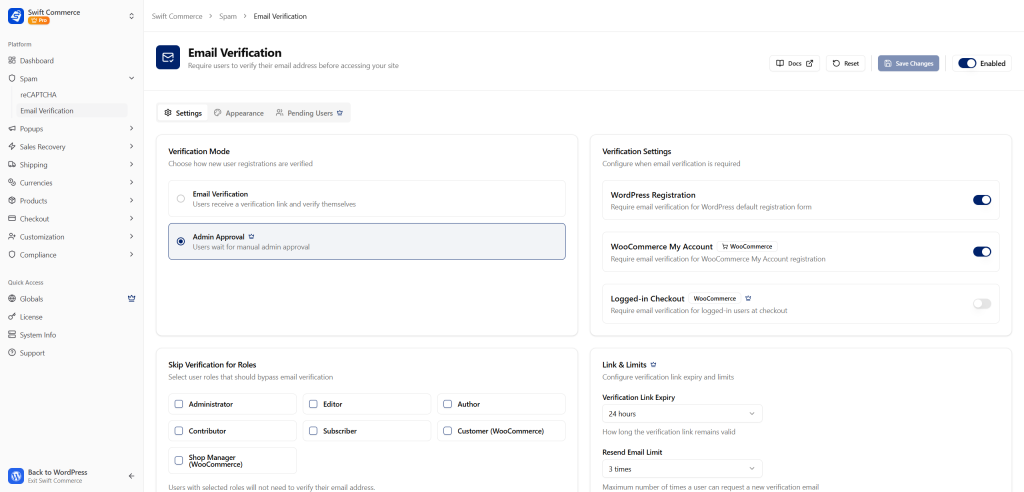
When I was building the security features for our WordPress plugin, I wanted to make sure our email verification module wasn’t just another “utility” but a professional-grade tool. I’ve integrated these features directly into the plugin so you don’t have to hunt for a third-party addon.
Auto Email Verification via Link
This is the standard for 2026. When a user signs up, the plugin automatically generates a unique, secure link and sends it to their inbox. Their account remains “Pending” or restricted until they click that link. This effectively kills 99% of bot registrations immediately.
Advanced Controls and Link Expiry
Security is only effective if it’s current. Within the settings, you can define exactly how long a verification link stays active. If a user doesn’t click it within 24 hours, the link expires, and they have to request a new one. This protects against “stale” accounts and ensures that the person trying to log in actually has access to the email address right now.
Manual Verification by Admin
There are always edge cases. Maybe a wholesale client is calling you on the phone and needs access to their account immediately, but their corporate firewall is being stubborn with the verification email. As an admin, you can go into the user list and manually verify them with a single click. This keeps your customer success team happy and your workflows moving.
The Power of the Built-in Email Designer
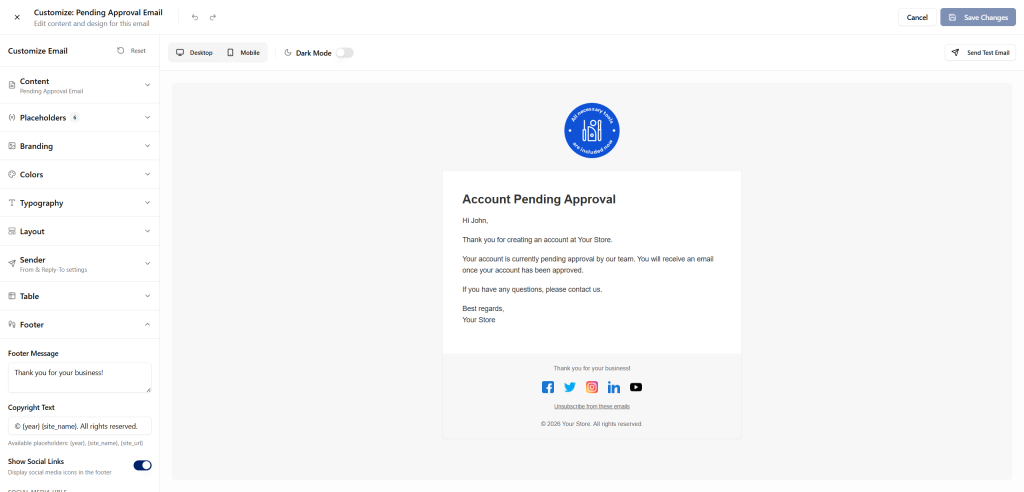
I’ve always been a bit obsessive about design, probably from my years spent with the Elementor community. It drives me crazy when a beautiful WooCommerce store sends out a verification email that looks like a plain text memo from 1995. It’s confusing for the customer and it looks unprofessional.
That’s why we included a full built-in email designer within the plugin.
You can drag and drop your logo, change the button colors, and rewrite the copy so it matches your brand’s voice. If your store is fun and quirky, your verification email should be too. If you are a high-end luxury brand, the email should reflect that. By making the email look official and branded, you increase the “Click-Through Rate” on those verification links.
It’s worth noting that if an email looks suspicious or unbranded, a lot of savvy users won’t click the link. They’ll assume it’s a phishing attempt. A customized, professional email removes that doubt and gets them into your store faster.
Using Analytics to Clean Your List
You can’t improve what you don’t measure. One of the most useful parts of having this feature integrated into your main WooCommerce addon is the Analytics.
In the dashboard, you can see exactly how many users are “Pending Verification.” If you see a massive spike in unverified users from a specific country or IP range, you know you’re being targeted by a bot attack. This data allows you to be proactive. You can jump over to your How to Recover 70% of WooCommerce lost sales strategy and see if those fake signups are affecting your cart abandonment stats.
Also, it helps you keep a “clean” list for your marketing. You should never, ever sync unverified users to your email marketing platform (like Mailchimp or Klaviyo). If you do, you are paying for subscribers who will never buy anything and who will likely hurt your deliverability. Our plugin’s analytics help you keep that barrier solid.
Setting Up a “Verified” Culture
I think it’s important to remember that verification isn’t a hurdle; it’s a standard. Most customers today expect it. They appreciate that you are taking their security seriously.
If you are worried about “friction,” my advice is to keep your copy helpful. Instead of saying “You must verify your account,” try something like, “We just want to make sure it’s really you! Please click the link below to unlock your account and start shopping.”
What’s more, you can use the verification process as a way to introduce them to your brand. Since you have that full email designer, you could include a “Welcome” coupon or a link to your “Best Sellers” right inside the verification email. You’re turning a security step into a marketing opportunity.
Final Thoughts: Don’t Wait for the Attack
Security is one of those things that feels like a chore until the day you actually need it. I’ve seen stores get taken down by bot-driven “brute force” attacks that could have been avoided with a simple verification step.
By choosing a native WordPress plugin like Swift Commerce, you are simplifying your life as a founder. You don’t have to manage five different tools or worry about whether your verification addon is going to break your checkout. Everything is designed to work together, staying lightweight and fast while providing “Enterprise-grade” security for your store.
Take ten minutes this week to audit your user list. If you see a lot of suspicious names and weird email addresses, it’s time to turn on verification. Your database, your email reputation, and your peace of mind will thank you.