It is a common misconception among new store owners that WooCommerce has a built-in system to handle abandoned carts. The reality is quite different. Out of the box, WooCommerce is excellent at processing an order once a customer clicks “Pay,” but it is completely silent when a customer walks away mid-checkout. There is no native “nudge,” no follow-up, and no recovery system. If you aren’t using a dedicated WordPress plugin to fill this gap, those lost sales are simply gone forever.
I’ve spent years helping people navigate the technical side of the WordPress ecosystem. I’ve seen stores with incredible products and high traffic struggle to grow because they were “leaking” 70% of their revenue at the checkout page. When they finally do decide to implement a recovery system, many make the mistake of sending plain, unbranded text emails.
In 2026, a generic email isn’t just ineffective—it is a security risk in the eyes of the consumer. This guide explores the psychological impact of branding in your recovery flow and how you can use a professional WooCommerce addon to turn “lost” visitors into loyal customers.
Also, learn: How to Recover 70% of Lost WooCommerce Sales Automatically
The “Trust Gap”: Why Branding Matters in the Inbox
When a customer leaves your store without buying, they are often in a state of “purchasing hesitation.” Maybe they got distracted by a phone call, maybe they weren’t sure about shipping costs, or maybe they just wanted to think about it. Whatever the reason, the bridge of trust between you and that customer is still very fragile.
Now, imagine that customer opens their inbox an hour later and sees a plain-text email that says: “You left items in your cart. Click here to finish.”
To a savvy modern shopper, that looks like a phishing attempt. It has no logo, no familiar colors, and no “vibe” that matches the store they were just browsing. In an era of increasing digital fraud, an unbranded email creates a “Trust Gap.” Instead of feeling like a helpful reminder from a brand they liked, it feels like a suspicious automated script.
Recognition is Retention
Branding is about more than just a logo. It is about recognition. When you use a WordPress plugin that allows you to send fully branded recovery emails, the customer immediately recognizes your store’s “visual language.” The colors match the site they were just on. The fonts look familiar. The tone of voice is consistent. This recognition lowers their guard and makes them much more likely to click that “Return to Cart” button.
The Problem with “Generic” Recovery Methods
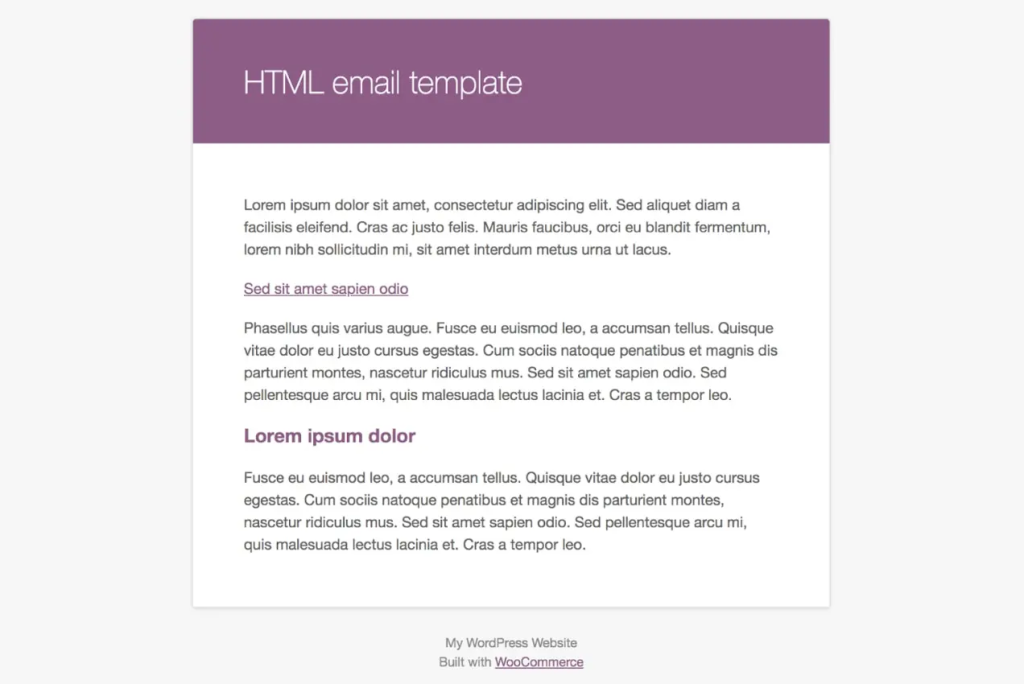
If you use a basic recovery tool that doesn’t offer a visual designer, you are essentially sending a “digital receipt” to a person who hasn’t even bought anything yet.
1. Lack of Visual Context
A generic email often fails to show the customer what they actually left behind. If I’m shopping for a specific pair of hiking boots, I want to see a picture of those boots in the email. Plain text can’t convey the emotion of the product. By showing the product image directly in the email, you reignite the “want” that caused them to add it to the cart in the first place.
2. Poor Call-to-Action (CTA) Design
In a generic email, the link to return to the cart is usually just a blue underlined URL. It doesn’t stand out. A branded email uses a high-contrast, professionally designed button that practically begs to be clicked.
3. No Emotional Connection
E-commerce is emotional. We buy things because they solve a problem or make us feel a certain way. A branded recovery sequence allows you to tell a story. You can use your brand’s personality—whether it’s professional, funny, or luxury—to reconnect with the user on an emotional level. You can’t do that with a basic system notification.
How Swift Commerce Solves the Recovery Crisis
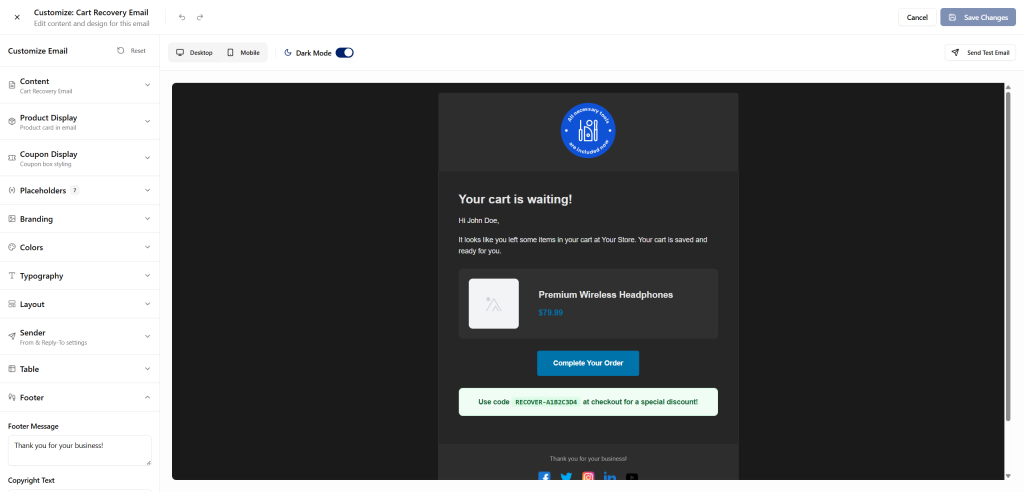
When I was building the cart recovery features for our WordPress plugin, I knew we had to go beyond just “sending an email”. I wanted to create a system that felt like a natural extension of the store’s design, especially for users who are already using powerful design tools like Elementor.
1. The Built-in Visual Email Designer
This is the heart of a professional recovery strategy. Our WooCommerce addon includes a Built-in Visual Email Designer that works very much like the page builders you are already familiar with.
- Easily Customizable: You don’t need to touch a single line of code. You can edit its content, visuals, or anything with all controls available on the left sidebar.
- Brand Consistency: You can set your global brand colors and fonts so that every recovery email looks exactly like your website. If your site uses “mountain blue,” your email buttons use “mountain blue”.
2. The Power of the “Rebuild Cart” Logic
One of the biggest friction points in recovery is making the customer find their items all over again. If they click a link and land on an empty cart page, they will leave and never come back.
Our plugin uses Rebuild Cart logic. When the customer clicks the button in your beautifully branded email, they are taken directly back to the checkout page with their items already waiting for them. It is a seamless “one-click” return to the finish line. This level of technical sophistication is what allows you to actually recover 70% of those lost sales.
3. Sophisticated 5-Email Sequences
One email is rarely enough. A professional recovery strategy requires a sequence. With Swift Commerce, you can set up a series of up to five automated emails.
- Email 1 (1 Hour Later): The helpful nudge. “Did you forget something?”
- Email 2 (24 Hours Later): The social proof. “Others love these items, too!”
- Email 3 (48 Hours Later): The incentive. “Here is a 10% coupon to help you decide.”
- Email 4 (72 Hours Later): The scarcity. “We can only hold your cart for another 24 hours.”
- Email 5 (1 Week Later): The final goodbye. “Last chance to grab your favorites.”
Because each of these emails is designed in our visual editor, they all feel like a cohesive campaign rather than a series of annoying pestering messages.
4. Smart Coupons:
You don’t have to manually add coupons to each email. With Swift Commerce, you can add coupons automatically with each email sequence. The smart coupons gets generated for each customer, and they can only be used once. You don’t have to manage the coupons, or when they are generated, you just have to specify the discount rate with each email sequence.
Psychology in Practice: Designing for Conversion
When you are using the email designer in your WooCommerce addon, keep these three psychological principles in mind:
1. The “Mere Exposure” Effect The more a customer sees your brand in a positive, professional context, the more they will like and trust it. A beautifully branded email reinforces your brand’s presence in their mind. Even if they don’t buy from the first email, you are building “Brand Equity” for the future.
2. Reducing Cognitive Load A clean, branded design is easier for the brain to process. By using clear headings, high-quality images, and a single, obvious button, you are making the decision to return to the store “easy.” If the email is cluttered or looks like a wall of text, the customer’s brain will view it as “work” and they will skip it.
3. Social Proof and Authority Since you have a visual designer, use it to include a testimonial or a “Star Rating” block in your recovery emails. Seeing that 500 other people gave those hiking boots a 5-star review is often exactly the “nudge” a hesitant buyer needs to finish the purchase.
Technical Performance: Lightweight and Integrated
I know what you are thinking: “Won’t a visual designer make my site slow?”
In the WordPress world, we are often forced to choose between “features” and “speed.” But we’ve optimized our plugin to be incredibly lightweight. Because the email designer is built into the core WooCommerce addon, it doesn’t require a dozen external libraries to function.
The emails are processed on your server (or via a dedicated SMTP service) in the background. It doesn’t add a single millisecond to your customer’s browsing experience on the front end. You get all the power of a professional email marketing suite like Klaviyo or Mailchimp, but it is all managed directly inside your WordPress dashboard.
Analytics: Knowing What Works
You can’t manage what you don’t measure. One of the most important aspects of using a professional recovery system is the Advanced Analytics.
In the Swift Commerce dashboard, you can see:
- Open Rates: Are your branded subject lines working?
- Recovery Rate: What percentage of abandoned carts are actually turning into sales?
- Revenue Recovered: Exactly how many dollars has the plugin added to your bottom line this month?
This data allows you to iterate. If you see that “Email 3” with the 10% coupon is recovering 40% of your sales, you know that your audience is price-sensitive. If you see that “Email 1” is doing all the work, you know your customers just need a quick reminder.
Final Thoughts: From “Broken” to “Branded”
If your WooCommerce store doesn’t have a recovery system, your sales process is fundamentally broken. You are doing the hard work of marketing and SEO, only to let 70% of the results slip through your fingers at the very end.
Implementing a recovery flow is the single most impactful thing you can do for your store’s ROI. But don’t settle for “generic.” Use a WordPress plugin that gives you the creative freedom to send emails that represent your brand with pride.
By using the Cart Recovery and Visual Email Designer features in Swift Commerce, you are moving from a “reactive” store to a “proactive” business. You are showing your customers that you value their time, you respect their security, and you are professional enough to follow up with style.
Stop leaving your revenue to chance. Take control of your inbox, brand your recovery, and start winning back the customers you’ve worked so hard to find.