In the current eCommerce landscape, the threat to your WooCommerce store is rarely a single, dramatic “hack.” Instead, it is a slow, silent erosion caused by automated scripts. Bot registrations are the background noise of the internet, but if left unchecked, they can become a primary reason for site instability, skewed analytics, and destroyed email deliverability.
I’ve spent years working with the WordPress community, specifically helping store owners transition from basic setups to professional-grade businesses. One of the most common issues I see is a “User” table filled with thousands of accounts that have no intent to buy. These aren’t just empty rows in a database; they represent a significant drain on your server resources and a major security vulnerability.
As we move through The WooCommerce Security & Compliance Checklist for 2026, our focus must shift toward Silent Protection that is, stopping bot registrations on our e-commerce store. In 2026, you cannot afford to stop bots by annoying your customers with clunky challenges. You need a defense strategy that is invisible to humans but impenetrable to machines. This is why I built a native security layer into my WordPress plugin. By combining intelligent bot mitigation with strict email verification, you can turn your store into a fortress without adding a single second of friction to the customer journey.
The Hidden Cost of Bot Registrations
Before we dive into the “how,” we must understand the “why.” Why do bots register on your site? Usually, it is to facilitate “Carding” attacks (testing stolen credit cards), scraping your pricing data, or planting “sleeper” accounts to exploit future vulnerabilities.
1. Database Bloat and Performance
Every time a bot successfully registers, it adds data to your wp_users and wp_usermeta tables. Over time, a database that should have 5,000 real customers ends up with 50,000 entries. This bloat slows down every search, every login, and every database query. If you’ve been following my guide on How Site Speed Directly Impacts WooCommerce Conversion Rates, you know that a heavy database is a primary killer of conversion.
2. Email Deliverability Crisis
If your store sends a “Welcome” email to every new registrant, and 80% of those registrants are bots with fake or “dead” email addresses, your bounce rate will skyrocket. Major providers like Gmail and Outlook will quickly flag your domain as a source of spam. This means your legitimate receipts and shipping notifications will start landing in your real customers’ junk folders.
3. Fraud and Security Risks
Bots often use registration as a foot in the door. Once they have a “verified” account, they may attempt to bypass certain security checks on your checkout page or exploit discount codes meant for new users.
Phase 1: Intelligent, Frictionless Bot Mitigation
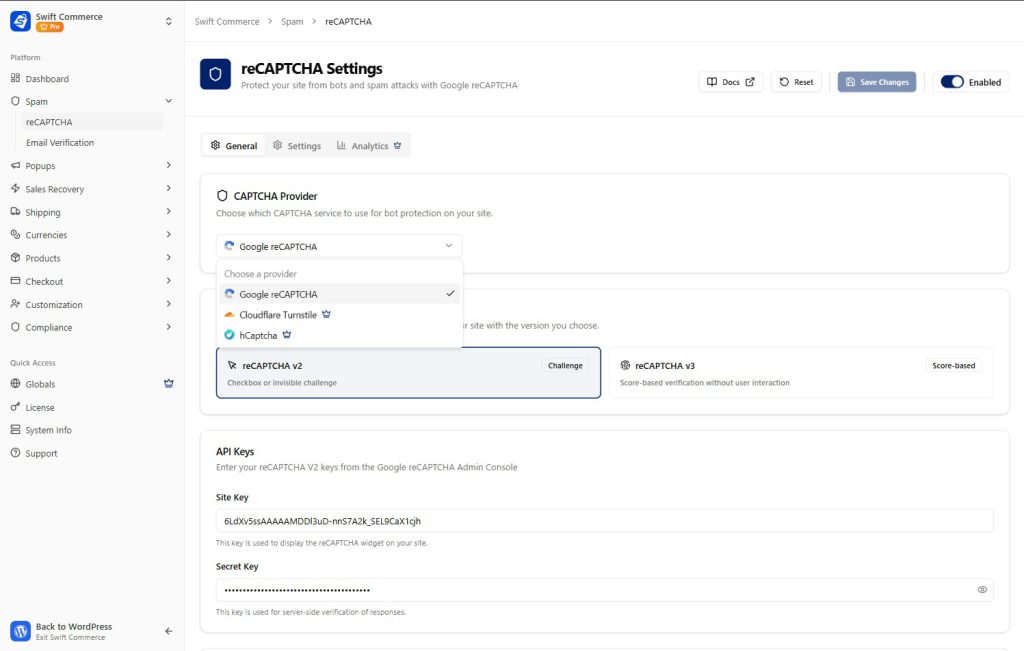
The first line of defense is stopping the bot before the registration form is even submitted. Traditionally, we used CAPTCHAs that asked users to identify buses or fire hydrants. In 2026, that is a conversion killer.
Within our WooCommerce addon, we have implemented a flexible security layer that supports the industry’s most advanced providers. Whether you prefer Google reCAPTCHA v3, Cloudflare Turnstile, or hCaptcha, the goal is the same: silent, behavioral-based protection.
The Power of reCAPTCHA v3
I am a huge advocate for reCAPTCHA v3 because it runs completely invisibly. Instead of showing a challenge, it monitors how a user interacts with your site, including mouse movements, typing speed, and click patterns. It then assigns a “risk score” between 0.1 (likely a bot) and 0.9 (likely a human).
In the Swift Commerce dashboard, you can fine-tune this threat threshold. If you’re seeing a surge in sophisticated bots, you can bump your threshold up to 0.7. This ensures that only the most “human” traffic gets through. The best part? Your real customers never see a single pop-up. They just type their info and click “Register,” completely unaware of the complex security check happening in the background.
Comprehensive Form Coverage
Bots don’t just target your registration page. They target every entry point. This is why our WordPress plugin allows you to extend this protection to every corner of your store:
- WordPress Login & Registration: Secure the “front door” of your site.
- WooCommerce Checkout: Stop bots from using your checkout as a credit card testing ground.
- Lost Password Forms: Prevent bots from spamming your server with password reset requests.
- Comment & Product Review Forms: Keep your social proof authentic and free from automated spam.
By securing these points, you are essentially “starving” the bots of the interactions they need to harm your business.
Phase 2: Validating Identity with Email Verification
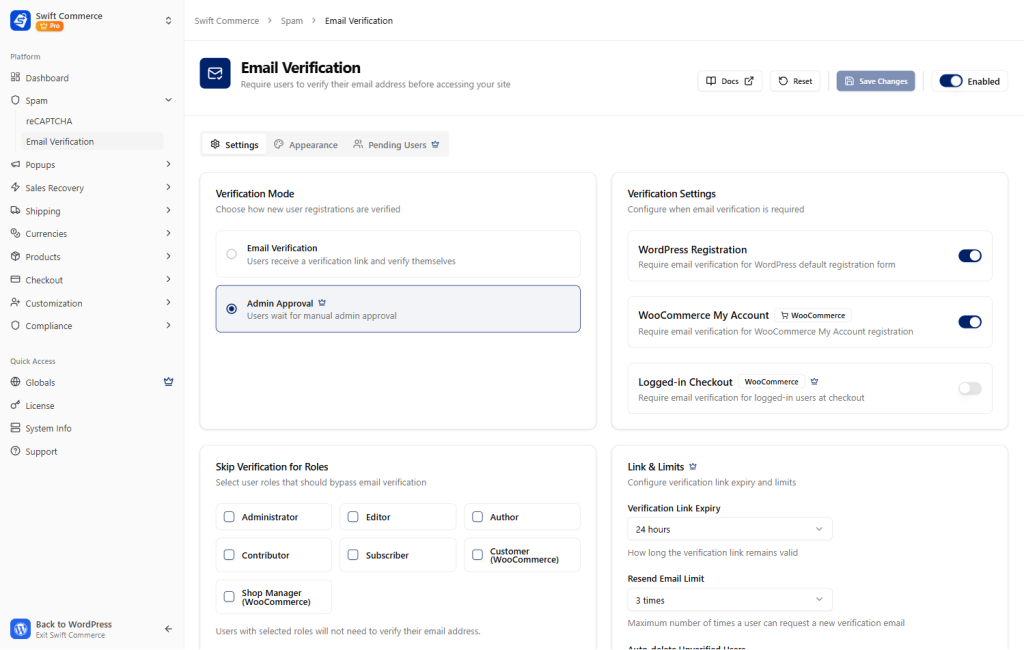
If a bot somehow manages to mimic human behavior well enough to bypass a CAPTCHA, your second line of defense is Email Verification. This is the ultimate “quality filter” for your database.
Verification ensures that the email address provided is real and that the person (or machine) behind it has access to that inbox. This effectively kills “Ghost Users” and ensures that your marketing list is 100% deliverable.
Automating the Verification Lifecycle
When a user signs up, whether via the “My Account” page, a WordPress registration form, or even a guest checkout, our WooCommerce addon fires off a unique verification link.
To maintain a clean database, you can configure Smart Automation:
- Customizable Link Expiry: Set links to expire after 24 or 48 hours. This prevents “stale” accounts from being verified weeks later.
- Auto-Delete Unverified Users: This is my favorite feature for performance. You can set the plugin to automatically purge accounts that haven’t been verified within a certain “grace period.” This keeps your database light and fast without any manual cleanup.
- Resend Limits: Prevent bots from triggering thousands of “Resend Email” requests, which could get your server blacklisted for spamming.
Integration with the Checkout Flow
One concern store owners often have is that verification will slow down the sale. We have solved this by integrating verification into the Checkout Flow. You can require verification for guest checkouts or even block orders from unverified emails. Because the communication is clear and the process is automated, it adds a layer of professional “security” that high-end customers actually appreciate.
Designing for Trust: Branded Verification Templates
As someone who has worked closely with the Elementor community, I know that design is a critical part of the trust equation. If your verification email looks like a generic system notification from 2010, the customer might hesitate to click the link.
We have included a Professional Email Designer directly within the plugin. This allows you to:
- Match Your Brand Voice: Customize the subject line and body text to sound like your brand, not a robot.
- Visual Consistency: Use placeholder variables to include the customer’s name and product details.
- Mobile Optimization: Ensure the verification link is easy to click on a smartphone, where most eCommerce happens today.
By removing the “Powered by” links and controlling every pixel of the email, you are reinforcing the idea that your store is a secure, premium environment. This is a subtle but powerful way to increase trust in your e-commerce store because it shows consistent professionalism across all touchpoints.
Advanced Management: The Admin Dashboard
Even with the best automation, as a founder, you need to stay in control. This is where the Pending User Management dashboard comes in.
Instead of hunting through the standard WordPress user list, you have a central hub where you can see every unverified account.
- Bulk Actions: Verify, resend, or delete hundreds of accounts with one click.
- Tracking & Status: See exactly when a verification link is set to expire and how many resend attempts have been made.
- Role-Based Logic: You can set rules to skip verification for certain roles (like wholesale partners) or apply it strictly to everyone else.
This level of management allows you to act as a “Subject Matter Expert” for your own store’s data. You can spot trends—like a sudden influx of unverified emails from a specific domain—and take action before it impacts your performance.
The Technical Advantage: Native vs. Third-Party
I have to be honest: there are dozens of standalone security and verification plugins in the WordPress repository. But using them is often like trying to build a car by buying parts from fifteen different manufacturers. They don’t always fit together, and the collective weight makes the car slow.
By using the security features built natively into Swift Commerce, you are choosing a “Zero-Conflict” architecture.
- One Database Footprint: Instead of three plugins making three separate database calls, one optimized system handles it all.
- Consolidated Scripts: We’ve ensured that our security scripts are lightweight and don’t block the main thread of your site.
- Simplified Maintenance: When WordPress or WooCommerce updates, you only have one plugin to check for compatibility, not five.
This isn’t just about convenience; it is about site health. Every choice you make to simplify your “stack” is a choice to make your store more resilient and more profitable.
Best Practices for Silent Protection in 2026
If you are ready to implement these features today, here is the “Founder’s Strategy” I recommend:
- Start with reCAPTCHA v3 or Cloudflare Turnstile: Set the threshold to 0.5. It is the perfect balance for most stores.
- Enable Email Verification for All New Roles: Make sure every new registrant has to confirm their identity.
- Customize Your Emails Immediately: Use the built-in designer to make your verification email look like a “Welcome” gift, not a security hurdle.
- Whitelist Your IP: Don’t get locked out of your own store! Use the whitelisting feature to ensure your team’s IPs are never challenged by the CAPTCHA.
- Monitor Your “Pending” List: Check your management dashboard once a week. If you see thousands of unverified users, use the bulk-delete tool to keep your database clean.
Final Thoughts: The ROI of Security
Security is often viewed as a “defensive” cost, but in the world of WooCommerce, it is an offensive strategy. A store that is free of bots is a store that is faster. A store that has a verified customer list is a store that has higher email open rates. A store that is secure is a store that customers trust with their credit card information.
By implementing these silent protection layers, you are investing in the long-term health of your business. You are moving away from the “patchwork” mentality of early-stage stores and toward a unified, professional strategy that values both performance and security.
Take control of your registration flow today. Stop the bots, verify your humans, and give your store the clean, secure foundation it needs to scale globally.