As we move further into the Average Order Value (AOV) cluster, we hit a strategy that most store owners overlook because they are too focused on selling “more stuff.” But as a fellow developer, I’ve realized that the most profitable way to grow a store isn’t always adding another physical product to the cart—it’s adding a service.
I remember talking to a store owner who was selling high-end espresso machines. He was doing okay, but his margins were being eaten alive by shipping and acquisition costs. We did a little experiment. We didn’t change his ads or his prices. We just added a “3-Year Extended Warranty” and a “White Glove Setup Service” as simple checkboxes on the product page.
His AOV jumped by 15% overnight. Perhaps more importantly, that extra revenue was almost 100% profit because there was no “cost of goods” for a warranty or a setup service. That is why we built a sophisticated Product Addons feature into Swift Commerce—to let you capture that high-margin revenue without the technical overhead.
The “Hidden Margin” in Digital Services and Warranties
When we talk about The 2026 Guide to Maximizing AOV, we usually think of “Frequently Bought Together” bundles. But the “Service Upsell” is a different beast entirely.
Think about the last time you bought something at an Apple Store or on Amazon. They don’t just sell you the device; they sell you the peace of mind. In WooCommerce, trying to replicate this used to mean installing a heavy, 5MB addon plugin that fought with your theme’s CSS and looked like an afterthought.
I’ve seen too many stores lose money because their “Addons” were so ugly or slow that they actually scared customers away from the main purchase. That is exactly why we created a lightweight, native way to handle these. By keeping the logic inside our small, consolidated package, your “Extended Warranty” checkbox appears instantly, matches your theme perfectly, and doesn’t add a millisecond of lag to the page load.
Using Conditional Logic to Keep Your Product Pages Clean
One mistake I see constantly is “Addon Overload.” If a customer is buying a $10 t-shirt, they don’t need a $50 professional installation service. If you show irrelevant options, you aren’t upselling; you’re just creating noise.
This is where the power of conditional logic comes in. In the Swift Commerce dashboard, it takes about 3 minutes to set up these rules. You can tell the system to only show the “Priority Shipping” addon if the cart total is over a certain amount, or only show “Gift Wrapping” for specific categories like Jewelry or Toys.
Also, it’s worth noting that conditional logic isn’t just for showing/hiding things. You can use it to change the price of the addon based on the product. A warranty for a $500 camera should cost more than a warranty for a $50 lens cap. By using these smart rules, you ensure that every offer is perfectly tailored to the customer’s intent.
The Psychology of the “Checkbox” Upsell
There is a specific type of friction called “Decision Fatigue.” If you ask a customer to go to a separate page to add a warranty, they won’t do it. But if you give them a simple checkbox right next to the “Add to Cart” button, the friction disappears.
I’ve noticed that when an addon is presented as a “low-cost upgrade,” the conversion rate is significantly higher. If someone is already spending $200, an extra $15 for “Insured Shipping” feels like a rounding error. It’s an impulse buy that provides real value.
We designed our addon interface to be “Friction-Free.” Whether you want a radio button, a dropdown, or a simple checkbox, it integrates directly with the WooCommerce price calculation. The total updates in real-time so the customer is never surprised at the checkout. It’s about being transparent and helpful, not “salesy.”
Case Study: Warranties vs. Physical Upsells
I recently ran a test comparing two different AOV strategies for a boutique electronics brand.
- Strategy A: Upselling a “Related Cable” (Physical product).
- Strategy B: Upselling an “Accidental Damage Protection” plan (Service).
While Strategy A had a slightly higher attachment rate, Strategy B produced 3x more net profit. Why? Because the cable had a wholesale cost, storage cost, and shipping weight. The protection plan had zero fulfillment cost.
By using our lightweight engine to power these service upsells, the brand was able to scale their profit without increasing their warehouse workload. It’s a “Guru” level move that most beginners overlook. They focus on the “Top Line” revenue, but the pros focus on the “Bottom Line” margin.
5 Services You Can Start Upselling Today
If you aren’t sure what “services” to sell, here are five that work for almost every WooCommerce niche:
- Priority Processing: “Skip the queue! We’ll ship your order within 4 hours.”
- Extended Holiday Returns: Give them 90 days instead of 30 for a small fee.
- Eco-Friendly Packaging: Let them pay $1 to use 100% recycled materials.
- Professional Assembly/Setup: Perfect for furniture, tech, or complex gear.
- Premium Support Access: A “VIP” line for technical help.
What’s more, because these are handled by our smart engine, you can track the performance of each one in your [Insert link to ‘Abandoned Cart Recovery’] analytics. If a certain addon is causing people to drop off, you’ll know immediately and can tweak it.
The Technical Edge: Why “Native” Beats “Third-Party”
I have to be honest with you—the biggest killer of WooCommerce stores in 2026 is Javascript Bloat. Every time you add a third-party addon plugin, you’re adding more scripts that have to be downloaded by the customer’s phone.
Most addon plugins are “heavy” because they try to be everything to everyone. They include hundreds of lines of code for features you’ll never use. Our approach with Swift Commerce was to keep the core logic “lean.”
Because our Addons module is part of the same package as your Currency Switcher and Back in Stock Notifications, they all share the same resources. There is no conflict. There is no lag. The customer clicks the checkbox, the price updates, and the “Add to Cart” happens instantly. That is the performance edge that helps you rank higher and sell more.
Implementation: The 3-Minute Setup
I promised this wouldn’t be a developer-only tool. You don’t need to write a single line of code to make this work.
- Step 1: Go and enable Product Addons inside WordPress Dashboard > Swift Commerce > Products > Product Addons.
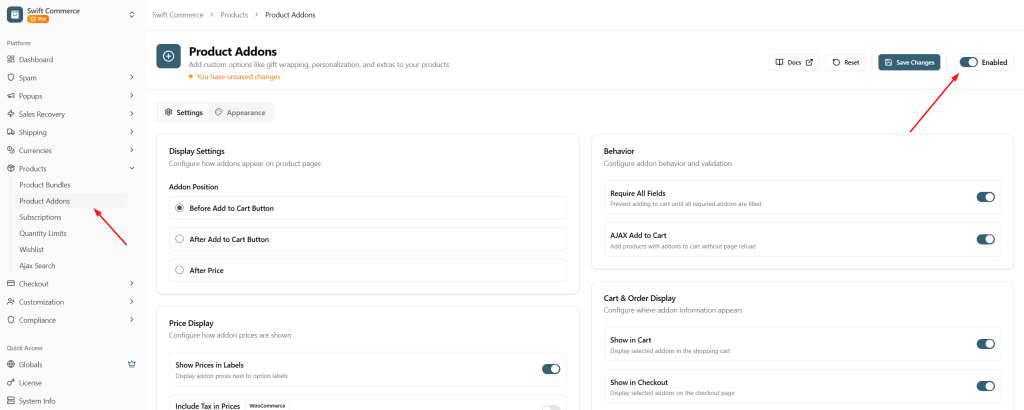
- Step 2: Create a new “Service” addon (like Gift Wrapping) inside WordPress Dashboard > Products > Add New Product > Product Data tab > Addons.
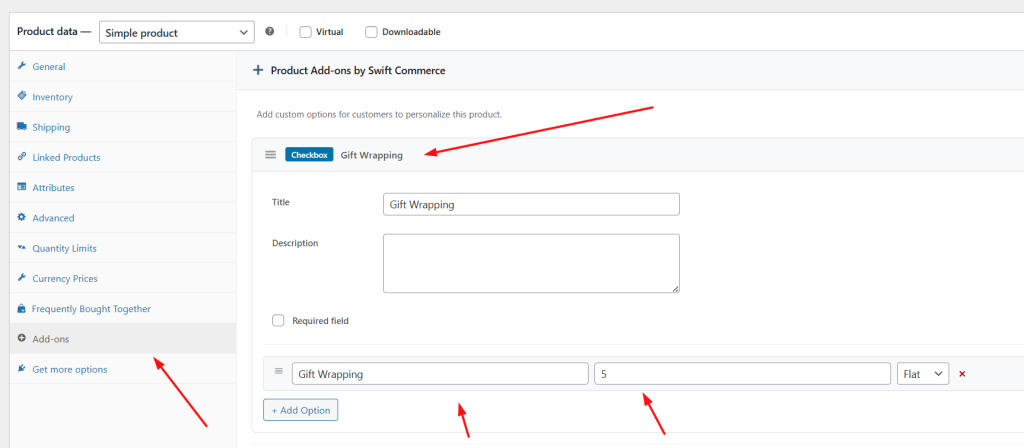
- Step 3: You can add it to your other products as well.
- Step 4: Set your price (Fixed or Percentage).
Honestly, the hardest part is deciding how much to charge. I usually suggest starting with a small 5-10% fee for warranties and seeing how the data looks after a week. You can always adjust the “markup” later.
Final Thoughts: Building a Resilient Store
Average order value isn’t just a number on a dashboard; it’s the lifeblood of your store’s sustainability. When ad costs go up (and they always do), the stores that survive are the ones that know how to maximize every single visitor.
By using Product Addons to sell services and warranties, you are building a more resilient business. You’re increasing your margins without increasing your inventory risk. You’re providing peace of mind to your customers while providing stability to your bottom line.
Stop thinking of your products as “finished” once they are on the shelf. Think about the service that goes along with them. Use a small, high-performance package to handle the technical side, and focus your energy on creating offers your customers can’t say no to.