I remember a time when every security plugin felt like a “speed tax.” You’d secure your site, but your checkout would suddenly take an extra two seconds to load. Honestly, it’s a trade-off no founder should have to make. When
I remember a time when every security plugin felt like a “speed tax.” You’d secure your site, but your checkout would suddenly take an extra two seconds to load. Honestly, it’s a trade-off no founder should have to make. When we built the security feature for Swift Commerce, the goal was simple: Zero-Friction Security.
By using v3, you’re using Google’s advanced risk analysis engine to assign a score to every interaction on your site. If a bot tries to brute-force your login or scrape your pricing, it gets a low score and is blocked. If a real human is just trying to buy a t-shirt, they never even see a challenge.
Phase 1: Generating Your Google API Keys
Before you touch your WordPress dashboard, you need to get your “credentials” from Google. This is a one-time setup that connects your store to the reCAPTCHA engine.
Register a New Site: Click the “Get Started” button to create a new property.
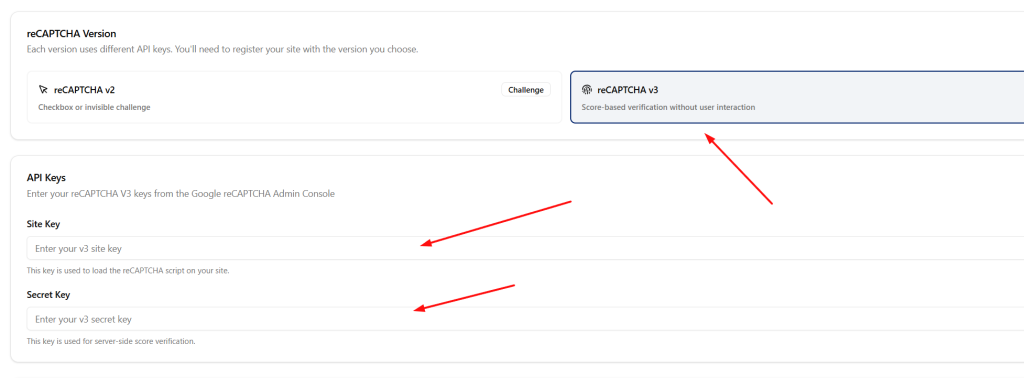
Select reCAPTCHA v3: This is critical. Do not select v2 “I am not a robot,” as that will force the manual checkbox on your users. Select v3 (Invisible) for the best user experience.
Enter Your Domain: Add your store’s URL (e.g., yourstore.com).
Copy Your Keys: Once submitted, Google will provide you with a Site Key and a Secret Key. Keep these safe; you’ll need them for the next phase.
Phase 2: Configuration via Swift Commerce
Now that you have your keys, it’s time to activate the “invisible shield.” Because we’ve built this directly into our free plugin, you don’t need a separate, heavy security plugin to handle this.
Step 1: Go to WordPress Dashboard > Swift Commerce
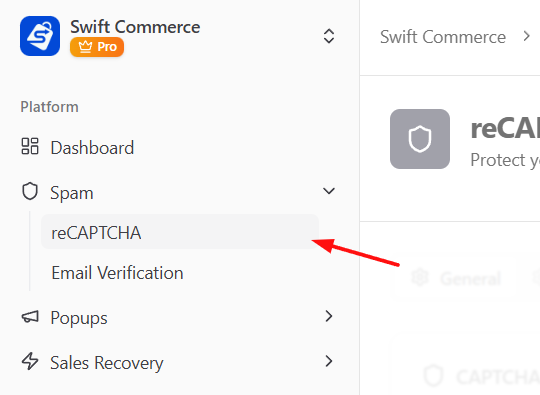
Step 2: Click on Spam > reCAPTCHA
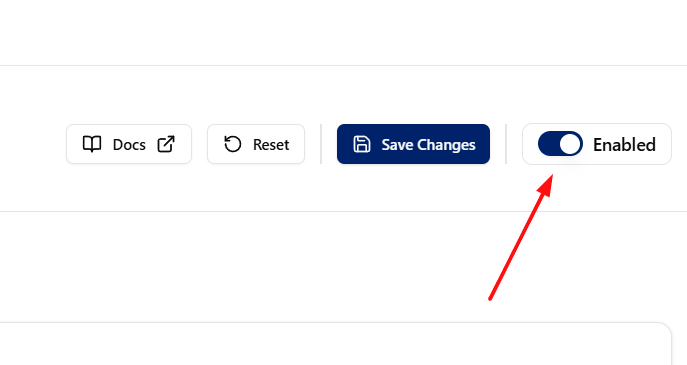
Step 3: Enable the feature via the right-side switch
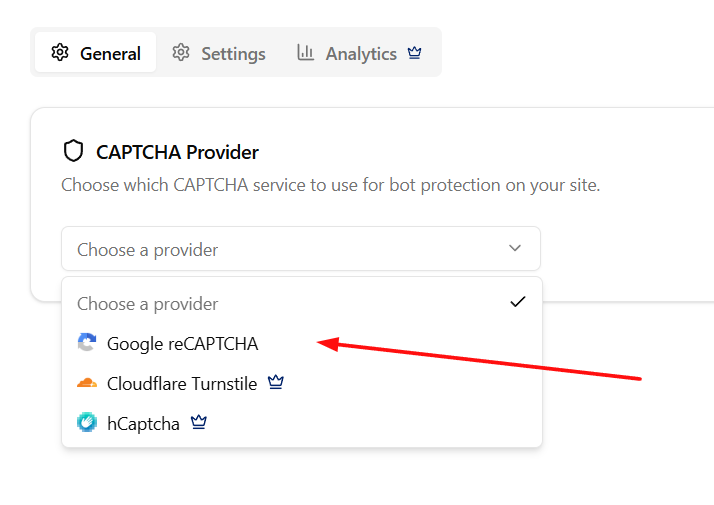
Step 4: Choose “Google reCAPTCHA” inside your captcha provider selector
Step 5: Choose reCAPTCHA v3 > Paste in your Site & Secret keys
Step 6: Save changes, and your reCAPTCHA is configured
Phase 3: Strategic Placement (Where to Defend)
One of the biggest mistakes I see is only protecting the “Login” page. In 2026, bots are targeting your Checkout and your Product Reviews to manipulate your store’s reputation or scrape sensitive data.
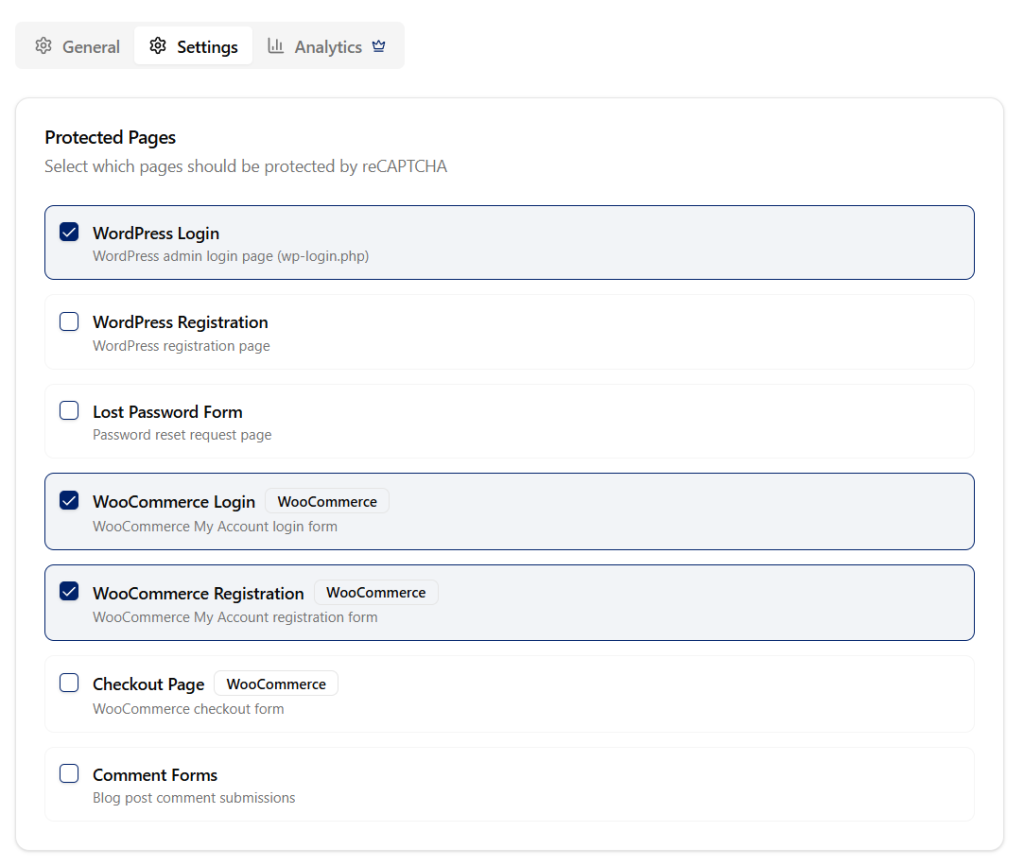
Through the Swift Commerce settings, I recommend enabling protection on:
The Checkout Page: This stops “Carding” attacks where bots test stolen credit cards on your site.
User Registration: This prevents the creation of “Ghost Users” that bloat your database.
Product Review Forms: This keeps your social proof authentic and free from automated spam.
The “Guru” Tip: Adjusting Your Sensitivity Score
reCAPTCHA v3 works on a scale of 0.0 to 1.0. A score of 1.0 is a very likely human, while 0.0 is almost certainly a bot.
Perhaps you find that you’re still getting a few spam signups. In that case, you can adjust your “Threshold” in the dashboard. I usually suggest starting at 0.5. If you’re in a high-risk niche, you might bump it to 0.7. It’s about finding that perfect balance between high security and a smooth customer experience.
Why This Beats the “Standard” Plugin Approach
Also, I have to mention the performance aspect. Most standalone reCAPTCHA plugins load their scripts on every single page of your site, even your blog posts where they aren’t needed.
Because we use a unified, “conditional loading” logic, our reCAPTCHA scripts only “wake up” on the specific pages you’ve chosen to protect. This keeps your [Insert link to Pillar: ‘How Site Speed Directly Impacts WooCommerce Conversion Rates’] in the green while keeping the bots in the red.
Final Thoughts: Set it and Forget it
Security shouldn’t be a daily task. It should be an invisible layer of your business that lets you sleep at night. By spending 10 minutes setting up reCAPTCHA v3 today, you are effectively “fireproofing” your store for the rest of the year.
You are protecting your server load, your search rankings, and most importantly, your customer’s trust. It’s a professional move for a founder who is ready to scale without the “noise” of the automated web.