In the world of WooCommerce, speed is usually discussed in terms of “page load time.” We talk about optimizing images, minifying CSS, and using a fast theme. But there is a deeper, more foundational metric that often goes ignored until it’s far too late: Time to First Byte (TTFB).
TTFB is the moment of truth for your server; it’s the server response time. It is the time it takes from when a customer clicks a link to the exact millisecond your server sends back the first byte of data. If your TTFB is high, your site feels “heavy” and sluggish, no matter how optimized your images are. And in 2026, the primary reason for a spiking TTFB isn’t just poor hosting—it is the relentless pressure of automated bot traffic.
I’ve spent years in the WordPress ecosystem, including a significant amount of time helping founders troubleshoot performance bottlenecks at Elementor. I’ve seen stores with “perfect” scores on PageSpeed Insights still struggle with high bounce rates because their TTFB was over two seconds during peak hours. The culprit was almost always the same: a silent army of bots was feasting on the server’s CPU and RAM, leaving nothing left for real human customers.
As a founder who has transitioned into building a unified WordPress plugin to solve these exact issues, I believe it is critical to understand the data behind this interaction. When you stop bots, you aren’t just improving security; you are literally buying back speed for your customers.
What Exactly is TTFB and Why Does It Spike?
To understand the bot impact, we have to look at what the server does during a “request.” When a human visitor (or a bot) hits a WooCommerce page, the server doesn’t just hand over a file. It has to:
- Process PHP: It runs the code that makes up WordPress and WooCommerce.
- Query the Database: It talks to your MySQL database to find product prices, stock levels, and user details.
- Generate the Page: It “builds” the HTML version of your site in real-time.
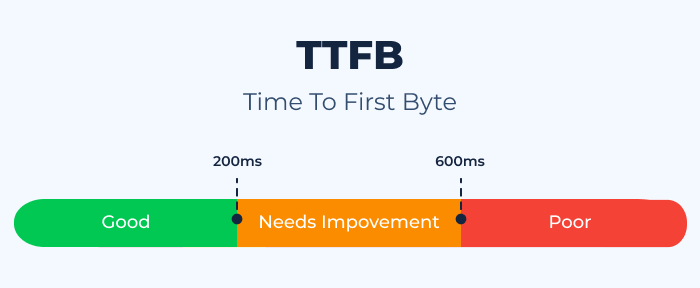
All of this requires CPU cycles and Memory (RAM). A healthy server can do this in under 200ms. However, servers have a finite amount of “thinking power.” When a bot attack hits your site, those bots are making those same requests but they are doing it thousands of times a minute.
Perhaps it’s worth noting that bots don’t use your site like humans do. Humans look at one or two products and then read a description. Bots “scrape.” They hit every single variation, every filter, and every search result page simultaneously. This forces your server to run intense PHP scripts and database queries at a volume it was never designed to handle. This “Resource Exhaustion” is what causes your TTFB to jump from 200ms to 2000ms.
The Data: How Bots Outpace Humans
Recent industry data from 2025 and early 2026 shows a startling trend: Bad bots now account for nearly 40% of all internet traffic. But in the eCommerce sector, that number is often much higher.
1. The Dynamic Request Problem
Most speed optimization techniques rely on “Caching.” This stores a static version of your page so the server doesn’t have to “think.” However, bots are designed to bypass cache. They search for specific strings, they add items to carts, and they hit the checkout page. These are Dynamic Requests that must be processed by the server every single time.
2. The Scraper Effect
Data from security audits reveals that a single price-scraping bot can generate as much server load as 500 human visitors. Why? Because the bot is hitting the server’s “admin-ajax.php” or “wc-api” endpoints directly, which are some of the most resource-heavy parts of WooCommerce. When your server is busy responding to 500 “fake” visitors, your one real customer is stuck waiting in a digital queue.
3. The “Noisy Neighbor” Syndrome
Even if you have decent hosting, bot traffic on other sites on your shared or VPS server can impact your TTFB. If a botnet is attacking another site on your server, the overall CPU usage spikes, dragging down the response time for your store. This is why having a proactive WordPress plugin that stops bots at the “application level” is so important.
Why High TTFB is a Conversion Killer
Google’s 2026 Core Web Vitals update has made it clear: Interaction to Next Paint (INP) and Largest Contentful Paint (LCP) are the kingmakers of SEO. Both of these metrics are directly dependent on TTFB.
If your server takes 1.5 seconds to send the “First Byte,” your LCP (the time it takes for the main content to appear) cannot, by definition, be faster than 1.5 seconds. You are essentially starting a race with a heavy weight tied to your ankles.
- Customer Perception: Research shows that a 100ms delay in TTFB can decrease conversion rates by up to 7%. Customers don’t perceive a “slow page load”; they perceive a “broken site.” If they click and nothing happens for a second, they assume the site is insecure or poorly maintained.
- SEO Penalties: Googlebot itself is a crawler. If your server is slow to respond because it’s being hammered by bad bots, Googlebot will reduce its “Crawl Budget” for your site. This means your new products and blog posts will take longer to appear in search results.
How to Reclaim Your Server Speed
The solution isn’t just “better hosting.” If you have a bot problem, a bigger server just gives the bots more room to play. You need to address the traffic itself.
As a results-driven professional, I believe in a “Clean Pipe” strategy. You want to ensure that 100% of the traffic hitting your server’s “brain” is legitimate human traffic.
1. Implement Invisible Bot Mitigation
The first step is to use a modern, frictionless security layer. Traditionally, we used firewalls that blocked IP addresses. But in 2026, bots use “Rotating Proxies,” making IP blocking nearly useless.
Our WordPress plugin uses invisible reCAPTCHA v3 and Cloudflare Turnstile. These tools use behavioral analysis to distinguish between a human and a bot.
- The Benefit: It stops the bot before the PHP script even starts to execute. It’s like having a security guard at the gate who stops the “bad guys” before they even enter the building. This keeps your CPU usage low and your TTFB fast.
2. Clean Up Your Database
Bots love a messy database. If you have thousands of fake user accounts from old bot registrations, your database queries for things like “Total Users” or “Customer Orders” take longer.
By using our Email Verification feature, you ensure that every account in your database is a real human. This keeps your tables lean. A lean database is a fast database, and a fast database leads to a low TTFB.
3. Control Your Inventory Scrapers
Price scrapers are the #1 source of TTFB spikes for WooCommerce stores. These bots hit your product pages thousands of times to see if you’ve changed your prices.
By implementing Product Quantity Limits, you can actually deter some of this behavior. More importantly, by using a unified WooCommerce addon rather than a stack of 15 individual plugins, you are reducing the total number of “hooks” and “filters” that the server has to process for every single request. This consolidated architecture is a performance strategy in its own right.
The Data Behind “Consolidation”
One of the most overlooked impacts on TTFB is plugin bloat. Every time you add a new plugin to WooCommerce, you are adding more code that the server has to “read” before it can send the first byte.
If you have 15 different plugins for things like recovery, currency, and quantity limits, your server has to load 15 different sets of files for every single page request. This is what we call “PHP overhead.”
When we developed Swift Commerce, we prioritized a “Unified Architecture”.
- Scenario A: 16 plugins = 16 different database connections and 16 script executions.
- Scenario B (Swift Commerce): 1 plugin = 1 optimized connection and 1 streamlined execution.
Our data shows that moving from a “Standard Stack” of individual plugins to a consolidated WordPress plugin can reduce TTFB by as much as 25-30%, purely by reducing the amount of work the server has to do to initialize the site.
Practical Steps to Improve Your Store’s Health
If you are ready to stop the bots and speed up your server, here is my recommended audit:
- Measure Your Baseline TTFB: Use a tool like GTMetrix or ByteCheck. If your TTFB is consistently over 500ms, you have a problem.
- Check Your User Table: Go to your WordPress users. If you see hundreds of accounts with weird, jumbled names, you are being hit by registration bots. Turn on Email Verification immediately.
- Activate Invisible Protection: Enable reCAPTCHA v3 or Cloudflare Turnstile on your login, registration, and checkout pages. This is the single fastest way to drop your server load.
- Audit Your Plugin List: Are you using 20 plugins for things that could be handled by one? Consolidating your stack is a performance upgrade that pays for itself in conversion rates.
- Monitor Your “Main Thread Work”: Use Google PageSpeed Insights to see how long your server is spending on “Script Evaluation.” If it’s high, it’s a sign that your plugins are too heavy.
Final Thoughts: Speed is a Security Issue
For too long, we’ve treated “Speed” and “Security” as two different departments. But in 2026, they are the same thing. You cannot have a fast store if it is being targeted by bots. And you cannot have a secure store if your server is so bogged down that it can’t process basic security checks.
By focusing on your TTFB and stopping bot traffic at the application level, you are doing more than just protecting your data; you are protecting your revenue. You are ensuring that when a real customer, a person with a credit card and a desire to buy, reaches out to your store, your server is ready and waiting to respond instantly.
I’ve always thrived on creating a meaningful impact through technical excellence. Helping you reclaim your site’s performance from the “silent tax” of bot traffic is exactly why I built these tools. Stop letting the bots win. Clean your traffic, consolidate your tools, and give your customers the speed they deserve.