I remember the first time I tried to buy a niche mechanical keyboard from a store in Germany. Everything looked great, the specs were perfect, but when I got to the checkout, the price was in Euros. I had to pause, open a new tab, search for the current exchange rate to my local currency, and then guess what my bank would actually charge me in hidden fees. Honestly, by the time I did the math, the “impulse” to buy was gone. I closed the tab.
This is a scenario that happens thousands of times a day on WooCommerce stores that haven’t optimized for a global audience. If you are selling to the US, the UK, Europe, and Australia, but only displaying prices in USD, you are essentially asking your international customers to do homework before they buy. And in 2026, customers don’t do homework—they just go to a store that speaks their language.
I’ve seen too many brilliant stores stay “local” simply because they were afraid of the technical headache of multi-currency setups. That is exactly why we built a high-performance Currency Switcher directly into the core of Swift Commerce. I wanted to eliminate the “mental math” barrier that stops international sales dead in their tracks. We designed it so you can turn your store into a global powerhouse without needing a degree in international finance.
The Psychology of Local Currency: Why It Matters for AOV
When we talk about How to Maximize Average Order Value, we usually think about bundles or upsells. But perhaps the biggest “hidden” lever for AOV is trust. When a customer sees a price in their own currency—whether it’s Yen, Pounds, or Dirhams—their brain skips the “risk assessment” phase. They know exactly how much is leaving their bank account.
Most store owners think they can just put a disclaimer saying “Prices will be converted at checkout.” But that’s a conversion killer. I think of it like a restaurant that doesn’t put prices on the menu; it makes the customer nervous. By showing the local currency from the very first page, you’re telling the customer, “I value your business, no matter where you are.”
Technically, doing this used to mean installing a bulky 5MB plugin that constantly pinged external APIs, slowing down your site every time a page loaded. We approached this differently. We’ve consolidated the entire switching logic into our small, React-based package so that the conversion happens instantly. It’s about providing that “Big Brand” experience without the “Big Plugin” bloat.
130+ Currencies and the “Set and Forget” Exchange Rates
One of the biggest fears I hear from developers is the “Exchange Rate Nightmare.” No one wants to spend their Monday morning manually updating the value of the Euro against the Dollar.
To solve this, we ensured that the Swift Commerce switcher supports more than 130 currencies right out of the box. But more importantly, we built in an “Auto Rates” system. The plugin pings reliable financial APIs to update your rates automatically. You can set it to update daily or even hourly, so your margins are always protected.
Also, for those who prefer absolute control, we’ve included a “Fixed Rate” option. Perhaps you want to keep your prices at a solid 0.99 ending for psychological reasons, regardless of the tiny fluctuations in the market. You can manually override any currency to keep your pricing strategy consistent. It’s worth noting that having this flexibility is what separates a professional store from a hobbyist site.
Protecting Your Margins: The “Markup” Strategy
Here is something I learned the hard way: your bank and the customer’s bank are going to take a cut during the conversion. If the official exchange rate is 1.2, your payment processor might actually charge you a “hidden” fee that makes it feel more like 1.15. If you aren’t careful, selling internationally can actually eat your profits.
What’s more, we’ve built in a specific feature to handle this: the ability to add a percentage on top of the auto rates. I call this the “Safety Buffer.” You can charge up via a % value—say, adding a 2% or 3% markup to all converted prices.
This covers those pesky bank conversion fees and ensures that your net profit remains the same whether the customer is in New-York or New-Delhi. It’s a subtle way to protect your business while still giving the customer the convenience they want. When you use this correctly, you can scale globally with total confidence that your bottom line is safe.
Auto Detection: The “Zero Friction” Experience
The ultimate goal of any international store is to be invisible. You want the customer to land on your site and feel like it was made specifically for them.
This is why we focused so heavily on the Auto Detection of Currencies. Using Geo-IP logic, the Swift Commerce engine detects where the customer is located the moment they arrive. If they are in London, they see Pounds. If they are in Tokyo, they see Yen.
I’ve noticed that most “standard” currency switchers wait for the user to manually click a dropdown menu. But honestly, most users won’t look for it. They’ll just see the USD price and assume you don’t ship to them. By automating the detection, you’re removing the “decision fatigue” before it even starts. It’s about being proactive. And because we’ve optimized this logic to be part of our lightweight engine, the Geo-IP check doesn’t add those dreaded seconds to your Initial Server Response Time.
Design Freedom with the Elementor Widget
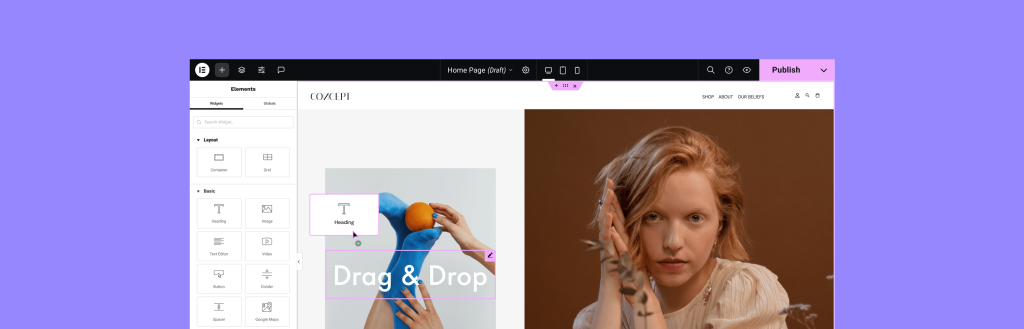
As a developer, I know that “function” is only half the battle. If your currency switcher looks like an ugly, unstyled dropdown from 2005, it’s going to ruin your beautiful site design. I’ve seen some great themes get absolutely wrecked by clunky plugin widgets that don’t match the CSS.
We solved this by building a dedicated Elementor Widget for the Currency Switcher. If you are using Elementor to build your headers or footers, you can drag the switcher exactly where you want it. You have full control over the typography, the colors, and the “Flag” styles.
Whether you want a sleek, minimal text link or a vibrant dropdown with country flags, you can style it in seconds. This level of design integration is usually reserved for custom-coded enterprise stores. But by building it directly into our suite, we’ve made it accessible for everyone. It helps you maintain that WooCommerce User Experience that keeps people on your site longer.
Technical Stability: Avoiding the “Pricing Flicker”
One thing that drives me crazy on poorly optimized stores is the “Price Flicker.” You land on a page, see the price in USD for half a second, and then it jumps to your local currency. It feels “hacky” and unreliable.
This happens because many plugins load their currency logic last, after the page has already rendered. We’ve engineered our switcher to be “hook-aware.” It handles the conversion at the server level (or as close to it as possible with our React logic), so the customer sees the correct price the moment the text appears on the screen.
Also, it’s worth noting that our switcher works seamlessly with the [Insert link to ‘Checkout Field Editor’]. This is critical. If your switcher changes the price but your checkout doesn’t reflect the same currency, you’ve just created a massive trust issue. Because Swift Commerce is a unified system, the currency choice follows the customer through the cart, the checkout, and even into the Shipment Tracking emails.
Scaling to 130+ Countries Without the Weight
I’ve seen some “Internationalization” plugins that weigh more than 10MB on their own. They try to do too much, and they end up being a burden on your server’s CPU.
When we say we’ve built a “lightweight” solution, we mean that we’ve stripped out the junk. We don’t load 130 flag images if you are only using 5 currencies. We only load what you need. This keeps your store fast, which is the ultimate key to ranking on Google in 2026.
I’ve often said that site speed is the best global marketing strategy. A fast store in a foreign currency will always outsell a slow store that is “perfectly” localized. With our engine, you get both. You get the global reach of 130+ currencies and the lightning-fast performance of a small, consolidated package.
Final Thoughts: The World is Your Market
If you are only selling to people who share your currency, you are leaving more than half the world on the table. The barriers to global trade have never been lower, but the competition for attention has never been higher.
Setting up a multi-currency store doesn’t have to be a technical hurdle. By using the Swift Commerce Currency Switcher, you can automate the rates, protect your margins with markups, and provide a seamless, auto-detected experience for every visitor.
Stop thinking of your store as a local shop. Start thinking of it as a global brand. Turn on the switcher, set your markup, and watch as your “Average Order Value” begins to include symbols from every corner of the globe.