If you’ve been running a WooCommerce store for a while, you know the sinking feeling of seeing a “Sold Out” badge on your best-selling product. It’s a bittersweet moment. On one hand, you’ve clearly found a product-market fit. On the other hand, every visitor who lands on that page and sees no way to buy is a lost lead. They might have been ready to pull the trigger right then, but instead, they’re heading back to Google to find a competitor who actually has the item on the shelf.
I’ve talked to hundreds of store owners who handle this in one of two ways. Some take the “hustle” route, keeping a spreadsheet of customer inquiries and manually emailing them when the shipment arrives. Others set up an automated system that handles the entire lifecycle of a restock alert without them ever touching a keyboard.
In the fast-paced world of 2026 eCommerce, the method you choose says a lot about how you value your time and your customer’s experience. This guide dives into the technical and psychological differences between manual and automated alerts, helping you decide which path will actually move the needle for your business growth.
How to Recover 70% of Lost WooCommerce Sales Automatically
The Manual Method: The Hidden Cost of the “Personal Touch”
Many boutique store owners start with manual emailing because it feels more “personal.” You get a DM on Instagram or an email to your support desk asking, “When will the blue velvet chair be back?” You reply, “Next Tuesday!” and you make a note to follow up.
But here is the thing: manual emailing doesn’t scale. What works for 5 customers is a nightmare for 500.
1. The Time Sink
If you have 50 people waiting for a specific SKU, that is 50 individual emails you have to draft, personalize, and send. Even with “copy-paste,” you’re looking at an hour of work just to announce one restock. As a founder, your time is better spent on high-level strategy, not data entry.
2. The Human Error Factor
In the WordPress space, we rely on data integrity. When you manage a restock list manually in a spreadsheet, things get lost. You might forget to BCC everyone, accidentally leaking your customer list to each other. Or worse, you email them three hours after the stock went live, only for the item to be sold out again before they even open the message.
3. Lack of Urgency
Manual emails often feel like a “newsletter” rather than a “transactional alert.” By the time you get around to sending that manual batch, the customer’s “buying itch” might have faded. You aren’t striking while the iron is hot; you’re striking whenever you find time in your schedule.
The Automated Method: Efficiency and Real-Time Relevance
The alternative is an automated WooCommerce addon that monitors your inventory levels for you. The moment your stock count moves from 0 to 1, the system triggers.
1. Instantaneous Response
Automation works on “hooks.” The second you update your stock in the WordPress admin, the plugin identifies every user who subscribed to that specific product ID and fires off the notification. There is zero lag. This is crucial because, in eCommerce, the first person to tell the customer “It’s here” usually wins the sale.
2. Scalability
Whether you have five people waiting or five thousand, the workload for you remains exactly the same: zero. An automated system handles the queue in the background, ensuring that your server doesn’t get overwhelmed while still reaching every single interested lead.
3. Data Collection
When a user signs up for an automated alert, they are giving you a high-intent data point. You aren’t just getting an email address; you’re learning exactly what products are in high demand. This allows you to make smarter inventory decisions based on actual waitlist numbers rather than just “gut feelings.”
Why Automation is the Engine of Growth in 2026
I’ve noticed a shift in customer expectations over the last few years. Customers no longer expect to “reach out” to a brand; they expect the brand to have a system in place for them. An “Out of Stock” button that doesn’t offer a “Notify Me” option feels broken. It feels like an unfinished website.
By automating this process, you are essentially building a 24/7 sales team. While you are sleeping, your WooCommerce addon is collecting leads. While you are on vacation, it is sending out restock alerts and collecting revenue. It turns your “Sold Out” pages from dead ends into lead-generation machines.
But it’s not just about sending the email; it’s about the quality of the communication. This is where a dedicated WordPress plugin like Swift Commerce changes the game for store owners who want professional-grade results.
Deep Dive: Back In Stock Notifications with Swift Commerce
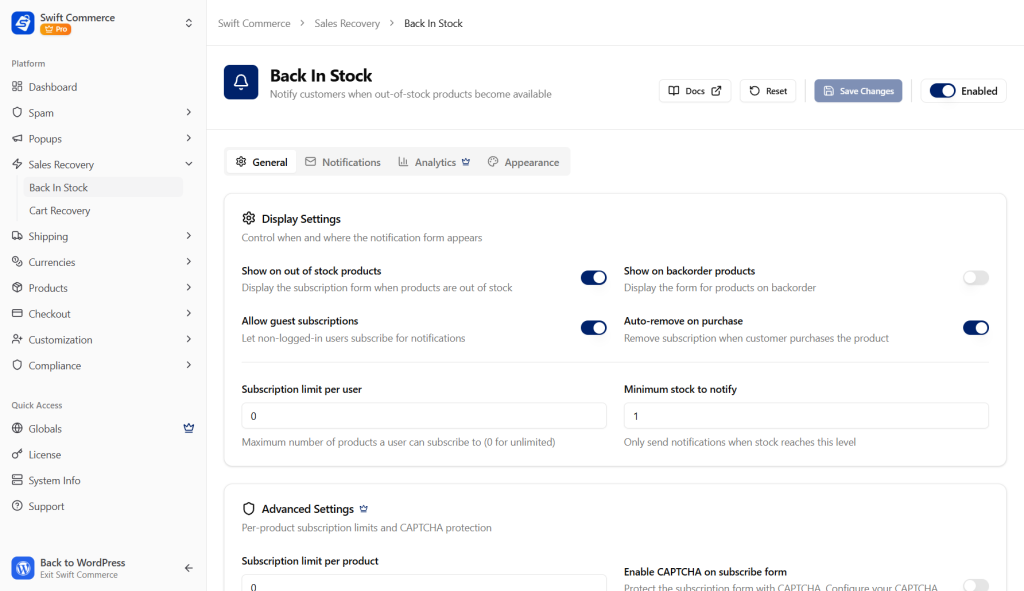
When I was looking at the landscape of restock plugins, I saw a lot of tools that were either too simple (no customization) or too complex (too much code bloat). I wanted to find a middle ground—a feature-rich WooCommerce addon that gives you full control without making the WordPress dashboard feel like a cockpit.
The Back In Stock Notification feature in Swift Commerce was designed specifically to address the pain points of manual management while providing “Enterprise-level” tools to small and medium businesses.
1. Precision Back in Stock Alerts
The core of the feature is a seamless “Notify Me” form that appears automatically on out-of-stock product pages. It integrates perfectly with your existing theme, so it doesn’t look like a “tacked-on” third-party script. It feels native to the WooCommerce experience.
2. The Built-in Email Designer: Brand Control
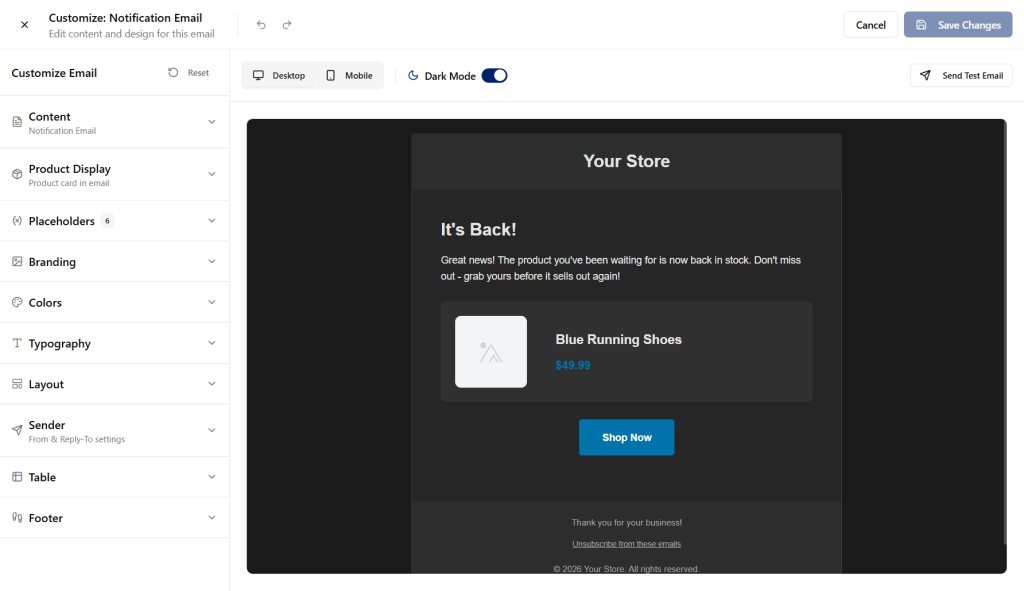
One of the biggest issues with standard restock plugins is that the emails they send look… well, ugly. They’re often plain text or use generic templates that don’t match your brand’s colors or voice.
Swift Commerce includes a Built-in Email Designer. This allows you to:
- Drag and drop your logo into the header.
- Customize the “Buy Now” button colors to match your site.
- Use dynamic shortcodes to automatically insert the product image and name.
- Write copy that sounds like you, not a robot.
When a customer gets a beautiful, branded email, they aren’t just being notified of stock; they are being reminded why they liked your brand in the first place.
3. Advanced Analytics: Business Intelligence
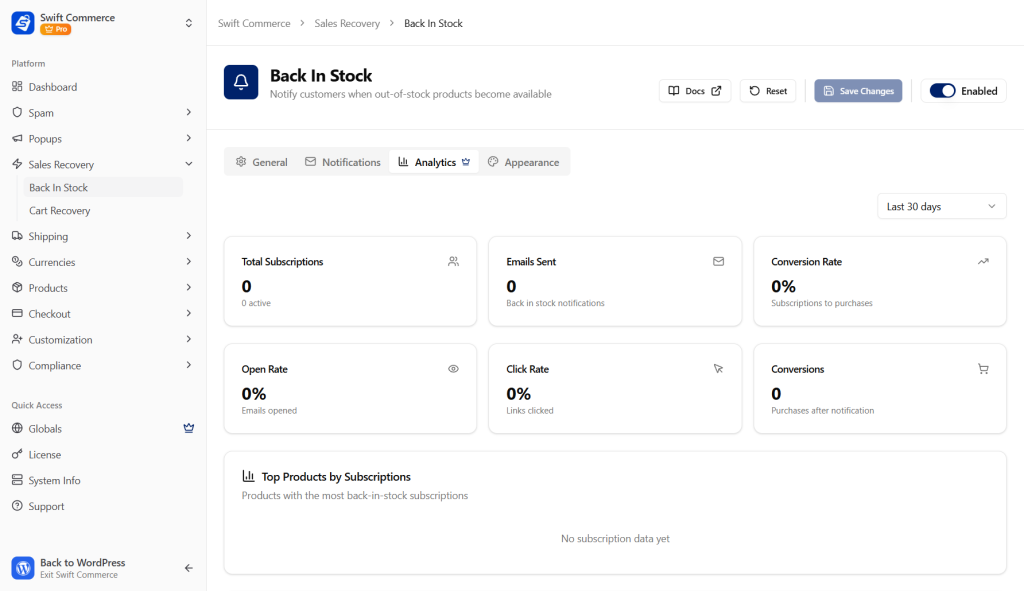
You can’t manage what you don’t measure. The Swift Commerce dashboard provides Advanced Analytics that tell you:
- Which products have the longest waitlists?
- What is the conversion rate of your restock emails?
- How much total revenue have you recovered through automated alerts?
This data is gold for your supply chain. If you see 200 people waiting for a “Red Medium T-Shirt” but only 10 waiting for the “Blue Large,” you know exactly where to put your manufacturing or ordering budget.
4. Advanced Controls and User Subscriptions
Every store has different needs. Some want to limit how many people can sign up for an alert, while others want to prioritize “VIP” customers. Swift Commerce offers Advanced Controls that give you granular power over the process:
- Stock Thresholds: Don’t send the alert if you only restocked one item (to avoid frustrating 100 people who will miss out). Set it to only trigger when you have 10 or more in stock.
- Subscription Management: Allow users to easily manage their own alerts or unsubscribe, which keeps your store compliant with global privacy laws.
- Loop Prevention: Ensure that the same customer doesn’t get spammed if you are doing small, incremental stock updates throughout the day.
The Final Verdict: Efficiency Wins
Also, it’s worth noting that “Manual” is often a synonym for “Expensive” when you factor in the cost of your time. If you spend three hours a week managing restock emails, and your time is valued at $50/hour, that manual “free” method is actually costing you $600 a month in lost productivity.
A high-performance WordPress plugin like Swift Commerce pays for itself the moment it recovers its first few sales. It’s about building a “Self-Healing” store—one that identifies a problem (out of stock) and immediately deploys a solution (automated waitlist) without you ever needing to check a spreadsheet.
I’ve always thrived on creating meaningful impact through my work, and there is no bigger impact you can make on your bottom line than turning “lost sales” into “guaranteed future revenue.” Stop the manual hustle and start letting your WooCommerce addon do the heavy lifting for you.