


Swift Commerce 1.3: Global Styles, Smarter CAPTCHA, and a Rebuilt Email Customizer for WooCommerce
 Feb 21,2026
  By Editorial Team
There’s something oddly satisfying about updating a plugin and actually seeing a long list of things that got better. Not just bug fixes disguised as features, but real, tangible improvements. Swift Commerce 1.3.0 is one of those updates, and honestly, it might be the biggest release we’ve shipped so far.
If you’ve been running a WooCommerce store and relying on a handful of separate plugins to get everything working, you already know the pain. Conflicts, slowdowns, style inconsistencies, the whole mess. Swift Commerce was built to replace that stack with something unified. And with version 1.3.0, the “unified” part just got a lot more meaningful.
Let me walk through what changed and, more importantly, why it matters for your store.
Global Styles: One Place to Control Your Entire Brand
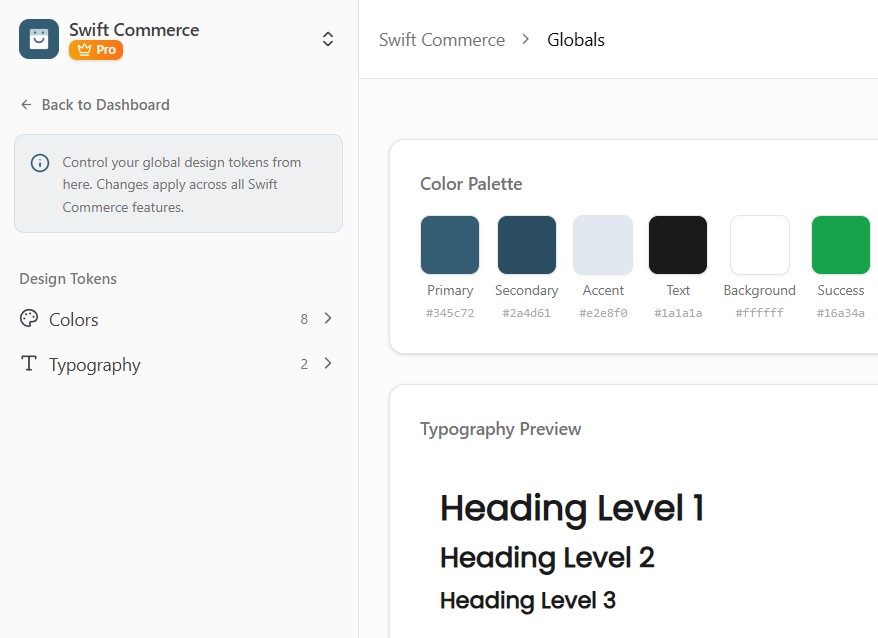
This is probably the headliner of the release, and I think it’s going to save a lot of people a lot of time. Before 1.3.0, if you wanted your wishlist button to match your cookie banner’s colors, you’d have to go into each feature’s settings individually and try to match things up. Maybe you’d get it close. Maybe you’d give up and just leave the defaults.
Global Styles fixes that. It’s a new centralised system where you define your store’s colour palette and typography in one place. Once you set your brand colours and fonts, those values become available across every single feature in the plugin. Every Customize Design tab now includes a Global Color Picker and a Global Typography Picker that pull from your centralized palette.
It sounds simple, and it is. That’s the point. You set your brand identity once, and it flows everywhere. If you update your primary color three months from now, every feature respects that change automatically. For anyone managing a store where brand consistency matters (which, let’s be honest, should be everyone), this is a big quality-of-life improvement.
Cloudflare Turnstile and hCaptcha Support

This one’s for the Pro users, but it’s worth talking about regardless. Until now, Swift Commerce supported Google reCAPTCHA for bot protection. It works fine, but not everyone wants to use Google’s services. Some store owners have privacy concerns, others operate in regions where Google services aren’t ideal, and some just prefer alternatives.
Version 1.3.0 adds two new CAPTCHA providers: Cloudflare Turnstile and hCaptcha. Both come with full backend verification, individual site key management, and their own appearance settings. There’s a new provider selector UI that lays out all three options as cards, so you can pick the one that fits your setup and configure it right there.
Cloudflare Turnstile is particularly interesting because it often works invisibly. Visitors don’t have to click checkboxes or identify traffic lights. It just quietly verifies that a real person is browsing your store. For checkout flows and registration forms, that’s a smoother experience than traditional CAPTCHA challenges.
hCaptcha, on the other hand, gives you more control over theme and size options, and it’s become a popular choice for stores that want privacy-focused bot protection without sacrificing effectiveness.
Having three providers to choose from means you’re not locked into any single ecosystem. That flexibility feels important, especially as privacy regulations keep evolving.
The Email Customizer, Rebuilt and Expanded
If you used the Email Customizer before, you might remember it lived inside the Subscriptions feature. It worked well enough for subscription emails, but it was limited. You couldn’t use it for other types of emails, and that always felt like a missed opportunity.
In 1.3.0, we pulled the Email Customizer out and turned it into a standalone global component. It now works with Back In Stock notifications, Email Verification emails, Subscription emails, and it’s ready for any future features we add. The visual editor with live preview is the same one you’re used to, but now it’s available everywhere.
There are some genuinely useful additions here too. The new Sender Settings section lets you configure your From Name, From Email, Reply-To Name, and Reply-To Email directly in the customizer. Previously you’d have to dig into WooCommerce’s email settings or use another plugin for that. Now it’s right where you’d expect it to be.
For Back In Stock emails specifically, there’s a new Product Display section. You can toggle whether to show the product image, product title, and price in your notification emails. There’s also a CTA button you can customize. The live preview updates in real time as you toggle things on and off, so you can see exactly what your customers will receive.
Oh, and the placeholder system got a proper upgrade. Tags are now categorized into Product, Customer, and Site groups, and you can insert them with a single click instead of trying to remember the exact syntax. It’s one of those small things that makes the editing process feel a lot less tedious.
Unified Customize Design Tabs Across Every Feature
This change might not sound exciting on paper, but it’s the kind of thing that makes the whole plugin feel more polished. Before 1.3.0, different features had different approaches to their appearance settings. Ajax Search had separate Display, Style, and Shortcode tabs. Currency Switcher had its own Customizations layout. Cookie Consent did things yet another way.
Now, all 12+ features share the same Customize Design tab structure. Each one gives you three pre-made template presets to pick from, a Custom template option with color controls, and for Pro users, advanced styling sections for typography, spacing, borders, and custom CSS. It’s consistent, predictable, and honestly just easier to navigate.
The template preset approach is something I think a lot of store owners will appreciate. Not everyone wants to fiddle with individual color pickers and font selectors. Sometimes you just want to pick a look that works and move on. The three templates give you that quick option, and the Custom template is there when you need more control.
Back In Stock Gets Proper Email Integration
The Back In Stock feature already did its job well. Customers could subscribe to out-of-stock products and get notified when inventory came back. But the notification emails themselves were pretty basic.
With 1.3.0, Back In Stock has full Email Customizer integration. The Notifications tab has been redesigned from a cluttered inline form into a clean list layout showing your two email templates: the Notification Email (sent when stock returns) and the Confirmation Email (sent when someone subscribes). Each has a “Customize Email” button that opens the full visual editor.
The product card rendering is perhaps the most practical addition here. Your notification emails can now include a styled product card with the product image, name, price, and a call-to-action button. It looks professional and gives customers an immediate visual reminder of what they were waiting for. The test email preview respects all your toggle settings too, so what you see in the preview is what your customers actually receive.
PHP 8.1+ Compatibility and Under-the-Hood Fixes
Not the most glamorous section, I know. But if you’ve been running PHP 8.1 or newer and noticed deprecation warnings in your debug log about strpos() getting null parameters, that’s fixed now. We tracked down every instance across both the Free and Pro plugins and added proper null handling.
There was also a subtle but annoying issue where the Pro plugin’s frontend stylesheet would throw an “unregistered dependency” warning because the base Free plugin’s CSS handle wasn’t always registered early enough. The Free plugin now registers its frontend styles unconditionally at an earlier priority, so the dependency chain always resolves cleanly.
These aren’t features you’ll see in a settings panel, but they’re the kind of fixes that keep your error logs clean and your site running without unexpected notices.
A Few More Things Worth Mentioning
The Elementor Product Bundles widget has been removed. With WooCommerce’s block editor support maturing, maintaining a separate Elementor widget for something that blocks handle natively felt redundant. If you were using it, the block editor alternative is more flexible anyway.
The sidebar navigation now includes a Globals entry point for the new centralized style management. Config files across all features have been updated with template definitions and design system tokens. And the “Customize Email” buttons throughout the plugin now use the brand color consistently, which is a small visual detail but it makes the interface feel more cohesive.
Wrapping Up
Version 1.3.0 is less about adding one big headline feature and more about raising the baseline of what Swift Commerce does across the board. Global Styles makes brand consistency effortless. The Email Customizer is no longer feature-specific. CAPTCHA protection gives you real choices. And every feature’s design controls now follow the same logical pattern.
If you’re already using Swift Commerce, the update is available now. If you’ve been considering it as a replacement for your plugin stack, this release is a good reason to take a closer look. The whole point of an all-in-one solution is that everything should work together and feel like it belongs together. I think 1.3.0 gets meaningfully closer to that goal.
You can grab the update from your WordPress dashboard or download the latest version from the plugin page. Pro users will receive the update through their Freemius license automatically.